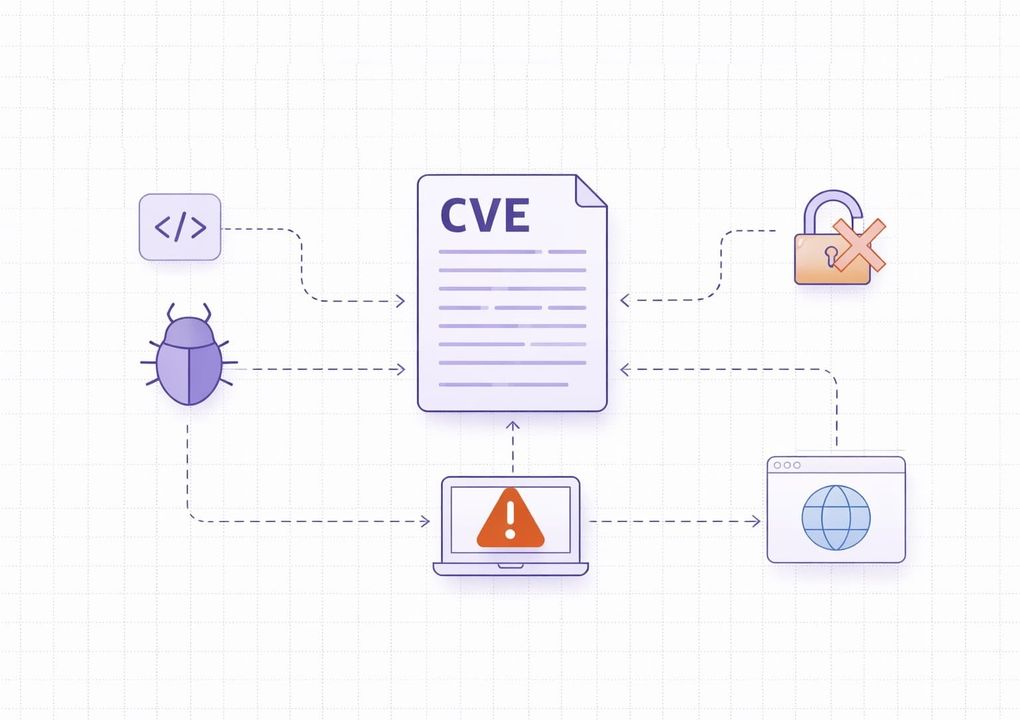

Vulnerability assessment is critically important to organizations today, and its importance will only continue to grow. Why? Because tens of thousands of new vulnerabilities are reported each year. According to recent reports, over 40,000 Common Vulnerabilities and Exposures (CVEs) were published in 2024.
That number is useful as context, but volume alone is a poor remediation strategy. Security teams need a way to separate noisy findings from vulnerabilities that are internet-facing, business-relevant, or tied to active exploitation.
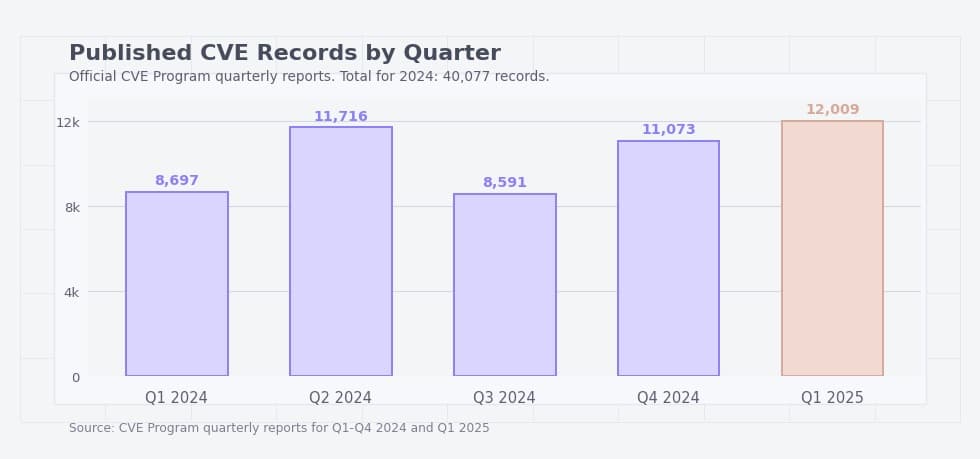
Given this trend, security teams face a growing triage problem - not every published CVE creates the same practical risk. What matters most is whether a vulnerability affects your assets, is reachable, and is already being exploited or likely to be exploited.
Fortunately, vulnerability assessment allows you to discover vulnerabilities in your IT environment and patch them before cybercriminals exploit them. So, what exactly is vulnerability assessment?
What Is a Vulnerability Assessment
A vulnerability assessment is a process of identifying security weaknesses in computer systems, applications, and networks, and understanding the security risk they pose. Let’s break this down.
First, a vulnerability is a weakness or flaw in your IT environment that leaves it open to exploitation by cybercriminals. For example, a company firewall may have open ports unnecessarily exposed to the internet. It is essentially a "door" that threat actors can use to gain unauthorized access and exfiltrate data.
So, vulnerability assessment is what you do to identify these doors and close them before threat actors can use them against your organization.
It usually involves:
- Finding vulnerabilities - Using vulnerability scanning tools to identify security weaknesses in your systems.
- Analyzing and validating vulnerabilities - Filtering out false positives and understanding the impact of valid findings.
- Risk scoring - This is where you determine the degree of risk posed by each vulnerability to understand which ones you should prioritize.
- Reporting - Finally, creating detailed reports on your findings. This informs the next steps of your vulnerability management program.
Purpose Of Vulnerability Assessments
The main purpose is to find vulnerabilities before attackers do and guide remediation efforts. It is a proactive approach that reduces the likelihood of data breaches and helps organizations respond more effectively if an attack occurs.
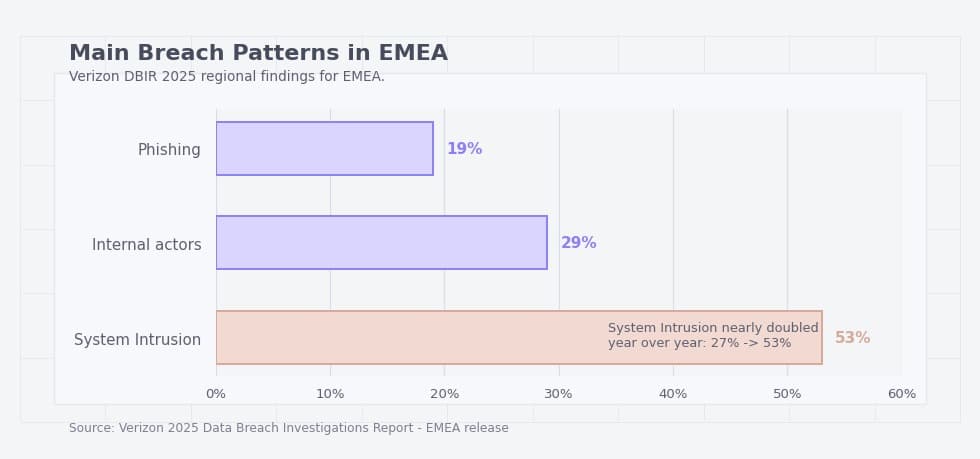
In the EMEA region, System Intrusion accounted for roughly 53 percent of confirmed breaches in 2025, according to Verizon’s 2025 DBIR. That figure underscores why proactive vulnerability assessments are crucial.
But that’s not all these assessments are good for. They can also support compliance programs, but the exact requirement depends on the framework. PCI DSS is the clearest example because it requires regular internal and external vulnerability scanning, while other regulations often require risk-based security measures rather than prescribing the same scan cadence.
Before moving forward, let’s first differentiate between vulnerability assessments and penetration testing (NIST SP 800-115).
Vulnerability Assessment vs Penetration Testing
While vulnerability assessment aims to identify vulnerabilities, penetration testing attempts to exploit these vulnerabilities to see if and how an attacker could be successful. During penetration testing, you authorize ethical hackers to simulate a cyberattack on a computer system, network, or application.
They test your defenses by attempting to find and exploit vulnerabilities, then report their findings, just as in a vulnerability assessment. While both methods help to strengthen your security posture, the way they go about it is different.
In other words, vulnerability assessments help identify vulnerabilities, and pentests validate how much of a threat they are.
Table 1. Vulnerability assessment vs penetration testing
|
Aspect |
Vulnerability assessment |
Penetration testing |
|
Primary goal |
Identify and document vulnerabilities, misconfigurations, and weak points across systems, applications, or networks. |
Attempt to exploit selected weaknesses in a controlled way to determine whether real compromise is possible. |
|
Main question answered |
What security weaknesses are present? |
Which of those weaknesses can actually be used to gain access, move laterally, or impact the business? |
|
Scope |
Usually broader. It can cover many assets at once, including servers, endpoints, network devices, applications, databases, and cloud resources. |
Usually narrower and more targeted. It focuses on specific systems, applications, user roles, or attack paths. |
|
Method |
Primarily uses automated scanning, configuration review, validation of findings, and risk analysis. |
Uses attacker-style techniques such as exploitation, privilege escalation, chaining weaknesses, and testing real attack scenarios. |
|
Depth of testing |
Broad but often shallower. It is designed to find many weaknesses efficiently. |
Deeper but usually less broad. It is designed to show whether a weakness can be turned into meaningful impact. |
|
Main output |
A prioritized list of findings with severity, affected assets, and remediation guidance. |
Proof of exploitability, attack paths, business impact, and recommendations to close the tested path. |
|
Evidence level |
Shows that a weakness is likely present and should be reviewed or fixed. |
Shows that an attacker could realistically abuse a weakness under the tested conditions. |
|
Typical cadence |
Recurring, scheduled, or continuous as part of ongoing vulnerability management. |
Periodic, after major infrastructure or application changes, or before high-risk launches and audits. |
|
Best use case |
Visibility at scale, ongoing triage, compliance support, and identifying what needs attention first. |
Validating real exploitability, testing defenses, and understanding how an attacker could move from one weakness to real impact. |
|
Who mainly uses the results |
Security operations, infrastructure teams, cloud teams, application owners, and compliance stakeholders. |
Security leadership, red teams, application security teams, and decision-makers evaluating business risk and control effectiveness. |
|
Main limitation |
Can produce noisy findings and does not always prove whether a weakness is exploitable in practice. |
Covers fewer assets, takes more time, and does not replace broad recurring assessment across the environment. |
|
When to choose it first |
When you need broad visibility, an initial baseline, or a repeatable process for finding and prioritizing weaknesses. |
When you need to validate critical findings, test a high-value application, or understand realistic attack paths and business impact. |
In practice, organizations usually need both. Vulnerability assessments provide broad visibility and prioritization, while penetration testing helps confirm which weaknesses can be turned into real compromise.
Key Types of Vulnerability Assessments
There are different types of vulnerability assessments depending on:
- The target of the assessment
- The perspective from which the assessment is done (inside or outside the network)
- How often the assessment is conducted (frequency)
Vulnerability assessments based on the target
The most common types of vulnerability assessments you’ll meet are based on the target of the assessment. They include:
Network vulnerability assessment. This focuses on finding vulnerabilities in a company’s network infrastructure, including firewalls, routers, servers, switches, and other connected devices. In this type of assessment, cybersecurity teams will scan for open ports, misconfigurations in firewalls or routers, unsecured protocols like Telnet, etc.
Application-based vulnerability assessment. This aims to identify security weaknesses in web, mobile, and desktop applications, especially those accessible via the internet. Application-based vulnerability assessment focuses on common OWASP Top 10 issues, such as SQL injection, cross-site scripting (XSS), and broken authentication.
Cloud vulnerability assessment. As the name suggests, this evaluates your cloud infrastructure for vulnerabilities such as exposed APIs, misconfigured storage buckets, or overly permissive IAM roles. The cybersecurity team can either use a tool provided by the cloud provider (like AWS Inspector) or a third-party vulnerability assessment tool.
Practical example is Capital One. The company says it learned of the configuration issue through its responsible disclosure program, while court filings describe the intrusion as involving a misconfigured web application firewall in its AWS-hosted environment. For all of us, this is a useful reminder that cloud assessments must cover not only software flaws, but also IAM and configuration weaknesses.
Database vulnerability assessment. Databases store critical information on operations, strategy, and credentials. So, database vulnerability assessments look for anything that could give threat actors easy access to the database. This includes weak user credentials, unencrypted data at rest (which attackers can easily access if they break in), and outdated database management system versions.
Vulnerability assessments based on where they are performed
You can do a vulnerability assessment from within the company network or outside it. This gives us two categories: internal and external vulnerability assessments.
External scans are performed outside the network to identify vulnerabilities in internet-exposed systems such as public-facing web applications, VPN gateways, and file servers. They help detect open ports, exposed services, and external misconfigurations.
Internal scans, on the other hand, are performed from within the network to find vulnerabilities that threat actors within the network can take advantage of.
Table 2. Which type of assessment do you need first?
|
If your main concern is... |
Start with... |
What it helps uncover first |
What it may miss |
What to add next |
|
Internet-exposed systems |
External assessment |
Open ports, exposed services, public-facing misconfigurations, outdated software, weak perimeter controls, and assets attackers can reach from the internet. |
Internal trust relationships, lateral movement paths, and weaknesses that only become visible after an attacker gets inside. |
Add an internal assessment to understand what happens after initial compromise. |
|
Lateral movement after compromise |
Internal assessment |
Weak segmentation, exposed internal services, legacy protocols, excessive privileges, and insecure paths between systems inside the network. |
What an attacker can discover and exploit from outside the organization before gaining access. |
Add an external assessment to cover the initial entry points as well. |
|
Web apps and APIs |
Application assessment |
Authentication issues, weak session handling, input validation flaws, authorization gaps, insecure business logic, and API-specific weaknesses. |
Broader infrastructure issues such as exposed services, weak network controls, or cloud configuration drift outside the application layer. |
Add an external or cloud assessment depending on how the application is hosted. |
|
Cloud drift and IAM mistakes |
Cloud assessment |
Misconfigured storage, overly permissive roles, exposed workloads, weak cloud networking controls, and risky identity relationships in cloud environments. |
Deep application logic flaws and some on-premises weaknesses that do not appear in cloud-native tooling. |
Add an application assessment for cloud-hosted apps and APIs. |
|
Sensitive records and credentials |
Database assessment |
Weak access controls, unencrypted data, risky default settings, outdated database versions, and insecure handling of privileged database accounts. |
Exposure in surrounding applications, identity systems, and network paths that may still allow attackers to reach the database. |
Add an application or internal assessment to understand how attackers could reach the data store. |
Vulnerability assessments based on the frequency
This refers to how often a vulnerability assessment is conducted. It could be:
- Continuous - This means ongoing vulnerability assessments to stay on top of your cybersecurity setup in real time.
- Scheduled - Conducting vulnerability assessments at a point in time regularly.
These are the main types of vulnerability assessments; there are many more categories and types that apply to specific use cases.
So, that’s what vulnerability assessments are. It’s now time to get practical and cover how to do a vulnerability assessment.
How Do You Perform a Vulnerability Assessment?
Vulnerability assessments are only successful when planned properly. This means getting the right methodology, teams, tools, and strategy in place. Failure to do so could leave your IT environment just as vulnerable as it was before. So, let’s outline a step-by-step process you can follow to perform a vulnerability assessment of your IT environment.
Vulnerability Assessment Methodology
The vulnerability assessment process typically includes the following steps: asset discovery and prioritization, vulnerability scanning, analysis, risk scoring, and reporting. It’s important to note that, although this framework is common, its implementation can be adapted.
Step 1: Asset discovery and prioritization
First, you’ll define what you want to assess for vulnerabilities, for instance, network appliances, servers, workstations, etc. However, this isn’t as simple as it sounds, especially when you want to include the following assets in your vulnerability assessment:
- Mobile devices - Employees have a wide array of devices, with each having unique settings, vulnerabilities, and management capabilities.
- IoT devices - Apart from the sheer volume and diversity, some IoT devices don’t respond to standard network protocols predictably. This makes them difficult to discover.
Essentially, discovering all the required assets isn’t easy because they’re scattered and they’re different. This is especially true for dynamic environments. FedRAMP guidance explicitly calls out ephemeral assets, container images, and the need for scanners to map findings back to an asset inventory. In practice, incomplete asset identification often matters as much as the scan itself
However, vulnerability scanning tools make this a lot easier. Before scanning, define scope, owners, scan windows, exclusions, and what counts as a production-critical system. A scan is much more useful when every asset can be tied to an owner and every high-risk finding has a clear escalation path.
Ideally, you would want to run a vulnerability assessment of all your systems. But, can you afford to do this? Vendors like to charge per asset, and the more assets you have, the higher the charges will be.
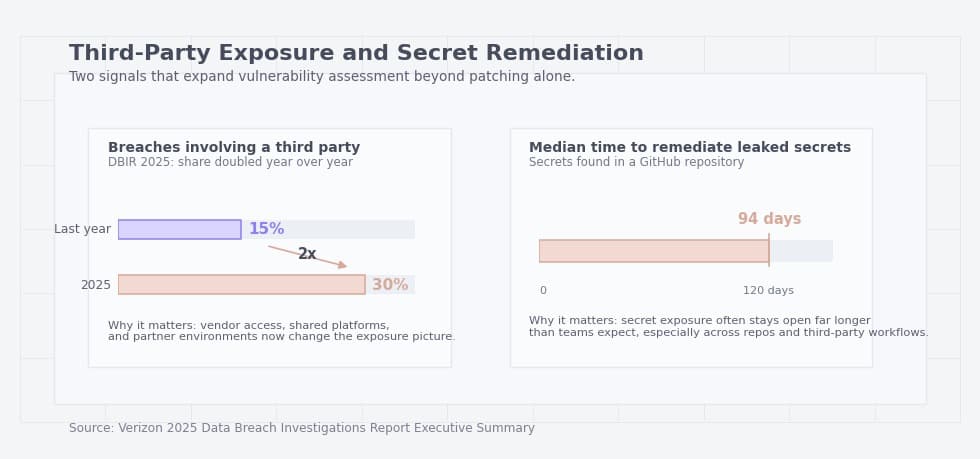
To prioritize intelligently, focus first on assets that are internet-facing, tied to sensitive data, exposed to third parties, or critical to authentication, payments, or customer operations. Cost matters, but business criticality and exposure should drive the first wave of assessment. If you can afford it, be sure to assess everything in your IT environment.
Step 2: Perform a vulnerability scan
After all the assets you wish to evaluate are in place, proceed to perform a vulnerability scan. You can either do this manually, if you have a dedicated cybersecurity team, or automatically with the help of vulnerability assessment tools. How exactly do these tools help in identifying vulnerabilities?
There is a lot of information on vulnerabilities stored in threat intelligence and vulnerability databases, such as the National Vulnerability Database (by NIST). These tools will use this information to identify known vulnerabilities on the systems being scanned.
In some cases, they’ll send a safe exploit to an asset to prove that there is indeed an exploitable weakness in a system. Depending on the scope of the scan, this can take anywhere from a few minutes to a few hours.
There are several ways to approach vulnerability assessment tooling, depending on whether you need a commercial platform with reporting:
- TopScan - A platform for teams that want continuous attack surface monitoring and vulnerability management, not just point-in-time scans. It combines external visibility with prioritization, tracking, and reporting.
- Nessus - A widely used scanner for broad infrastructure coverage.
- Qualys - A SaaS platform often used in larger cloud and hybrid environments.
- Intruder - A cloud-based scanner aimed at small and mid-size teams that want simple continuous and scheduled scans.
Table 3. How to choose a vulnerability scanner
|
If you need... |
Look for... |
Why it matters |
Red flag in a demo |
|
Broad infrastructure coverage |
Strong network and OS scanning, support for a wide range of asset types, authenticated and unauthenticated scans, and flexible scan policies. |
This helps teams assess servers, endpoints, network devices, and other core infrastructure without relying on multiple separate tools for basic visibility. |
The scanner only performs superficial checks, supports a narrow range of assets, or cannot clearly explain scan depth and coverage. |
|
Cloud and hybrid visibility |
Cloud API integrations, asset discovery across providers, cloud context, and visibility into misconfigurations, IAM risks, and exposed workloads. |
Modern environments are rarely limited to on-prem systems. Without cloud-aware visibility, important exposure may go undetected. |
The vendor claims cloud support but mainly treats cloud assets like traditional hosts, with little visibility into identity, storage, or provider-specific risk. |
|
Smaller-team usability |
Clear dashboards, simple prioritization, low setup complexity, workflow integration, and reports that are easy to act on without heavy tuning. |
Smaller teams often need speed and clarity more than a large number of advanced features they will rarely use. |
The tool looks powerful but requires constant manual tuning, complex rule building, or dedicated staff just to keep findings manageable. |
|
Lower licensing cost |
Open-source options, flexible pricing models, transparent asset-based licensing, and realistic implementation effort. |
The cheapest license is not always the lowest-cost option if the product needs heavy maintenance or multiple add-ons to become usable. |
Pricing is unclear, essential features are locked behind add-ons, or the total cost rises sharply as soon as asset counts grow. |
|
Validation and automation |
Rescanning, ticketing integration, prioritization support, fix verification, and the ability to reduce noisy or duplicate findings. |
A scanner becomes much more valuable when it supports the full workflow from detection to remediation and confirmation. |
The tool produces long lists of findings but offers weak prioritization, no retesting workflow, and no clear way to prove that a fix worked. |
|
Application and API coverage |
Support for web applications, authentication testing, API discovery, and checks for common application-layer weaknesses. |
Many modern exposures live in web apps and APIs rather than only in operating systems or network services. |
The product is strong on host scanning but weak on application logic, API visibility, or testing of authenticated areas. |
|
Actionable reporting |
Reports that separate critical findings, map issues to assets, assign ownership, and support both technical and executive audiences. |
A scanner is much easier to operationalize when reports help different stakeholders understand what matters and what to do next. |
Reports look polished but provide little remediation context, weak prioritization, or no clear distinction between confirmed and noisy findings. |
A useful vulnerability scanner should not only detect weaknesses, but also help teams understand coverage, prioritize what matters, and verify whether remediation actually worked.
Step 3: Analysis
The vulnerability assessment tool will return raw results once the scan is done. You can now review these results to, first of all, filter out the false positives. Not every reported vulnerability is a true threat; these tools aren’t immune to misinterpretation.
Next, you can group similar vulnerabilities together – for example, those targeting the database versus the firewall should be in separate categories. Keep in mind that most tools will do this for you automatically.
Step 4: Risk scoring and prioritization
The next step is to rank vulnerabilities by severity. This helps determine the order in which they should be prioritized.
Table 4. Practical vulnerability prioritization factors
|
Factor |
Why it matters |
What to check |
How it changes priority |
|
Severity |
Shows how dangerous the weakness is in general technical terms. |
Review the CVSS score, the weakness type, and the kind of impact it could have on confidentiality, integrity, and availability. |
Higher severity usually raises priority, but it should not be the only factor driving the decision. |
|
Reachability |
A vulnerability matters far more when it can actually be reached in your environment. |
Confirm whether the vulnerable service is accessible, whether the affected path is exposed, and whether the required conditions for exploitation are present. |
A reachable issue should usually be fixed sooner than a higher-scoring issue that is not realistically accessible. |
|
Exposure |
Internet-facing assets and weakly segmented systems tend to create faster attack paths. |
Check whether the asset is public-facing, available through VPN, limited to internal users, or protected by segmentation and access controls. |
Internet-facing or widely reachable assets should move up the remediation queue. |
|
Exploitation evidence |
A known weakness becomes more urgent when there is evidence that attackers are already using it. |
Look for KEV status, public exploits, active campaign reporting, exploit code availability, or signs of exploitation in the wild. |
Active exploitation or strong exploit evidence should sharply increase priority, even if the base severity is not the highest. |
|
Business impact |
The same vulnerability can have very different importance depending on what the affected asset does. |
Assess whether the system supports customer operations, payments, authentication, regulated data, core infrastructure, or sensitive internal workflows. |
Issues affecting high-value business systems should be prioritized above similar issues on low-impact assets. |
|
Ownership |
Even a critical finding can remain open if no one is clearly responsible for remediation. |
Identify the asset owner, technical team, escalation path, and whether the organization can act on the finding quickly. |
Clear ownership speeds remediation. Missing ownership should itself raise concern and may require escalation. |
|
Compensating controls |
Some vulnerabilities are partially mitigated by other protections already in place. |
Check for network restrictions, WAF rules, EDR coverage, MFA, segmentation, allowlists, monitoring, or temporary blocking controls. |
Strong compensating controls may lower urgency, but they should not automatically justify leaving the issue unresolved. |
|
Remediation effort |
Some high-value fixes are quick to implement, while others require major testing or change windows. |
Estimate whether the fix is a simple configuration change, a standard patch, a code update, or a complex infrastructure change. |
Quick, high-impact fixes should usually be pulled forward because they reduce risk faster with less operational cost. |
|
Detection confidence |
Not every scanner result reflects a confirmed, actionable issue. |
Validate whether the finding is confirmed, inferred, authenticated, or likely to be a false positive. |
Confirmed findings should be prioritized above uncertain results that still need investigation. |
Most organizations start with CVSS, but mature prioritization goes further. Teams should also account for exploit availability, KEV status, internet exposure, asset importance, and the likelihood that a finding is reachable in their environment. CVSS assigns risk scores ranging from 0.0 (None) to 10.0 (Critical) based on the factors mentioned above, plus others.
You can fill in information on your vulnerability and use the CVSS calculator to give you a score. Otherwise, most vulnerability management tools will do this for you.
Step 5: Reporting
A useful report should not be just a scanner export. It should answer five questions clearly: what was scanned, what was actually confirmed, what is most urgent, who owns remediation, and when fixes will be verified.
Ideally, the report should have a technical section that will guide the cybersecurity team through remediation and a non-technical part to keep stakeholders in the loop.
Table 5. What a useful vulnerability assessment report should contain
|
Section |
What it should include |
Why it matters |
Common mistake |
|
Scope and dates |
What was assessed, when the assessment was performed, which environments were included, and which assets or systems were out of scope. |
This helps understand the boundaries of the assessment and avoids false confidence about systems that were never checked. |
The report lists findings but does not clearly show what was and was not assessed. |
|
Asset inventory summary |
A short overview of the assessed assets, such as servers, applications, cloud resources, databases, endpoints, or internet-facing systems. |
You need to know whether the report reflects the most important parts of the environment or only a limited slice of it. |
The report jumps straight to vulnerabilities without showing which assets the findings relate to. |
|
Method and scan type |
The assessment method used, such as authenticated or unauthenticated scanning, internal or external testing, manual validation, and any major limitations. |
This explains how deep the assessment went and helps interpret the reliability and completeness of the findings. |
The report presents results without explaining how they were obtained or what the approach could not detect. |
|
Confirmed findings |
The validated vulnerabilities, affected assets, evidence, severity, and a short explanation of the issue. |
This separates real signal from scanner noise and makes the report much easier to act on. |
The report includes raw scanner output without distinguishing confirmed issues from unverified findings. |
|
Risk-based prioritization |
A ranked view of the most important findings based on severity, exposure, reachability, business impact, and exploitation context. |
Teams need to know what should be fixed first, not just what exists in the environment. |
The report relies only on CVSS or lists findings alphabetically with no real prioritization. |
|
Business context |
Notes on whether the affected systems support customer-facing services, sensitive data, authentication, payments, or other critical operations. |
The same technical issue can represent very different levels of risk depending on the role of the affected asset. |
The report treats all affected systems as equally important. |
|
Owner and remediation path |
The team or asset owner responsible for fixing the issue, together with the expected remediation path or escalation route. |
Findings are much less likely to stall when responsibility is assigned clearly. |
The report recommends fixes, but no one is named as responsible for carrying them out. |
|
Recommended actions |
Specific remediation guidance, such as patching, configuration changes, access restriction, secret rotation, or compensating controls. |
You need practical next steps, not just a description of the problem. |
The report explains the weakness but does not say what the team should do next. |
|
Rescan or validation plan |
How and when fixes will be rechecked, and what evidence will confirm that the issue has actually been resolved. |
A vulnerability is not truly closed until the organization verifies that remediation worked. |
The report assumes that applying a fix is enough and does not define any validation step. |
|
Executive summary |
A short non-technical overview of the biggest risks, the most affected areas, and the actions that need attention first. |
This keeps non-technical stakeholders informed without forcing them to read detailed technical findings. |
The executive section is either missing or repeats technical details without clear business meaning. |
Which Frameworks Can You Use to Conduct a Vulnerability Assessment?
There is no single framework that covers every part of vulnerability assessment equally well. In practice, it is better to use one source for testing methodology, another for ongoing monitoring expectations, and more specialized guidance for web applications, APIs, cloud environments, and governance. That approach is more accurate than treating every security standard as a step-by-step vulnerability assessment playbook.
- NIST SP 800-115 - is one of the best starting points for assessment methodology. It is specifically designed to help organizations plan and conduct technical security testing and assessment activities, analyze findings, and develop mitigation strategies. If your goal is to explain how vulnerability assessment should be structured and executed, this is a much better fit than a patch-management document.
- NIST SP 800-53 RA-5 and related monitoring controls - NIST SP 800-53 is not a step-by-step testing guide, but it is highly useful for defining what an ongoing vulnerability monitoring program should include. The RA-5 control family is relevant because it covers vulnerability monitoring and scanning expectations as part of a broader risk management model. In practical terms, this makes it useful for organizations that need repeatable scanning, documented processes, and alignment with formal security controls.
- OWASP Web Security Testing Guide - For web applications and APIs, the OWASP Web Security Testing Guide is one of the most practical resources available. It goes beyond generic scanning advice and provides a structured approach to testing areas such as information gathering, configuration, identity management, authentication, authorization, session management, input validation, business logic, client-side issues, and API security. That makes it especially valuable when the assessment target is an application rather than general infrastructure.
- CSA Cloud Controls Matrix - For cloud environments, the CSA Cloud Controls Matrix provides useful structure and control mapping. It is a cloud-specific control framework that organizations can use for the systematic assessment of cloud implementations and for understanding which security controls should be applied across the cloud supply chain. It is not a scanner methodology by itself, but it is very useful when vulnerability assessment needs to be aligned with cloud governance, shared responsibility, and compliance requirements.
- ISO/IEC 27001 - is best understood as a management-system standard, not as a hands-on vulnerability assessment manual. It defines requirements for establishing, implementing, maintaining, and continually improving an information security management system. That makes it useful for governance, risk management, policy alignment, and audit readiness, but not for explaining exactly how to execute a technical vulnerability assessment step by step.
What Services and Market Solutions Are Available for Vulnerability Assessments?
Apart from vulnerability scanning tools, here are other market solutions that make vulnerability assessments easier for you:
- Outsourcing - Instead of conducting vulnerability assessments in-house, you hire a specialized third-party cybersecurity vendor to do this for you. They’ll do everything from scanning, reporting, and remediation to rescanning to confirm if fixes have worked.
- Continuous assessment - Using tools or services that continuously scan your IT environment for vulnerabilities and report on them almost in real time. This is a great option as it allows you to stay on top of your cybersecurity setup at all times. Most vulnerability scanning tools and cybersecurity vendors provide this service.
- VAPT Bundles - These are cybersecurity packages that combine vulnerability assessments (VA) and pentests (PT). They help organizations discover vulnerabilities and evaluate if they are exploitable. Just knowing that a vulnerability is there isn’t enough. So, VAPT bundles go the extra mile of validating these vulnerabilities using pentests.
In practice, many organizations rely on platforms like TopScan to automate this process. TopScan continuously scans external infrastructure, web applications, and APIs, aggregates the findings in a single dashboard, and helps teams focus on the most critical vulnerabilities first.
Let’s look at one of these market solutions in action in a real-world example: Equifax later disclosed that the 2017 breach involved Apache Struts vulnerability CVE-2017-5638 as the initial attack vector, and the FTC said the company failed to take reasonable steps to secure its network. This is a stronger illustration of why recurring assessment, patch verification, and ownership matter than a vendor success story alone.
How Does Vulnerability Assessment Fit into the Vulnerability Management Life Cycle?
Vulnerability assessment is one of the first key steps of a vulnerability management program. It helps to identify and validate risks that feed the later stages of vulnerability management. The assessment produces a report that guides the remediation process.
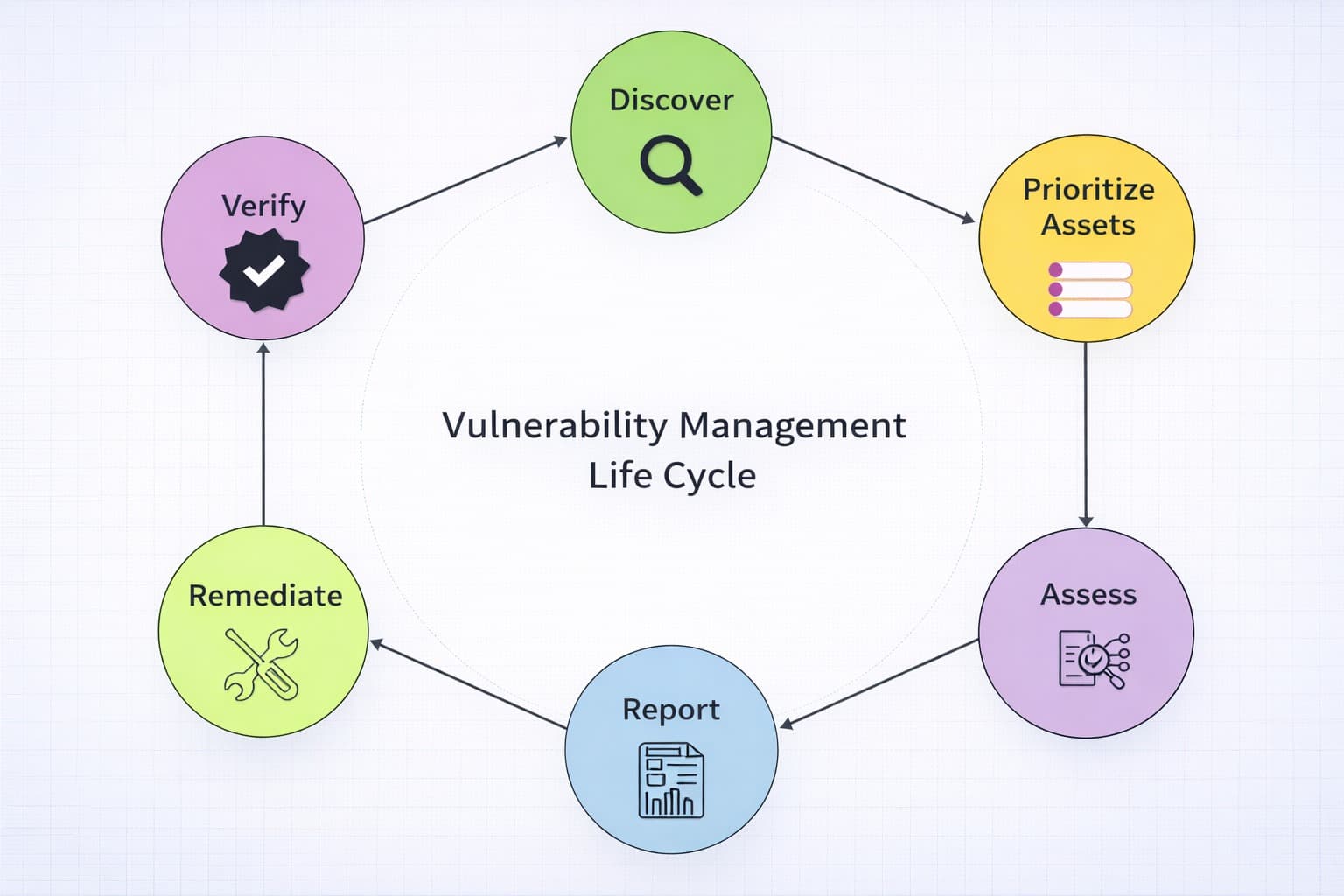
It outlines which vulnerabilities should be prioritized and recommends some fixes that can be applied during the remediation process. After the fixes have been applied, their effect can be verified by going through another round of vulnerability assessment.
It is a cyclical process that ensures vulnerabilities are dealt with to prevent attackers from exploiting them.
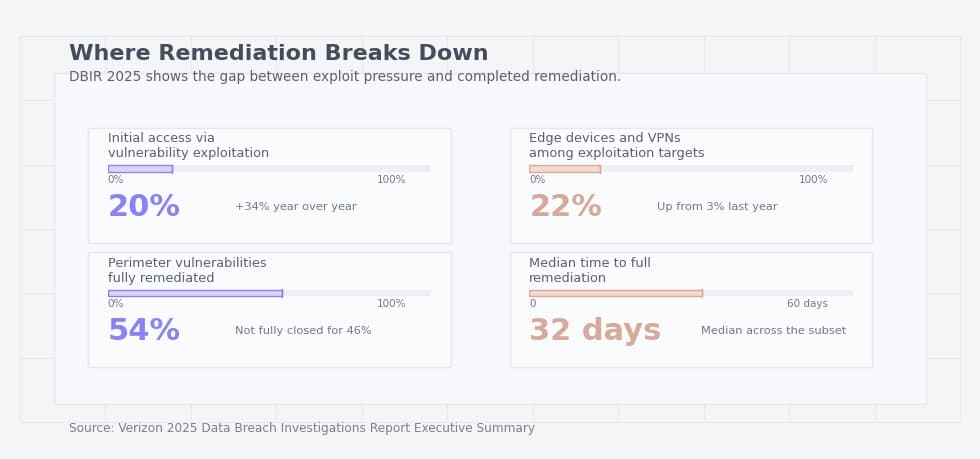
A vulnerability assessment creates value only when findings become actions. If the report does not name an owner, define a deadline, and specify how the fix will be verified, it is just a technical snapshot.
Five Questions to Ask After Any Vulnerability Assessment
- Did we scan the assets that actually matter most?
- Which findings are confirmed and reachable, not just theoretical?
- Which critical findings are tied to internet-facing systems or sensitive data?
- Who owns remediation for each high-risk issue?
- When will we recheck the fix?