
Most people have clicked a suspicious link or heard about a major data breach and wondered how incidents like that happen. In many cases, the starting point is a vulnerability. A vulnerability is a weakness in a system, application, or configuration that an attacker may be able to exploit.
Attackers look for these cracks all the time. And if they find one, they can get into systems, steal data, or cause major damage. This article explains what cybersecurity vulnerabilities are, why they matter, and how teams identify and manage them.
What Are Cybersecurity Vulnerabilities?
A cybersecurity vulnerability is a weakness or flaw in a system, network, or piece of software that an attacker can exploit. Security vulnerabilities can allow attackers to gain unauthorized access, steal sensitive data, or disrupt operations.
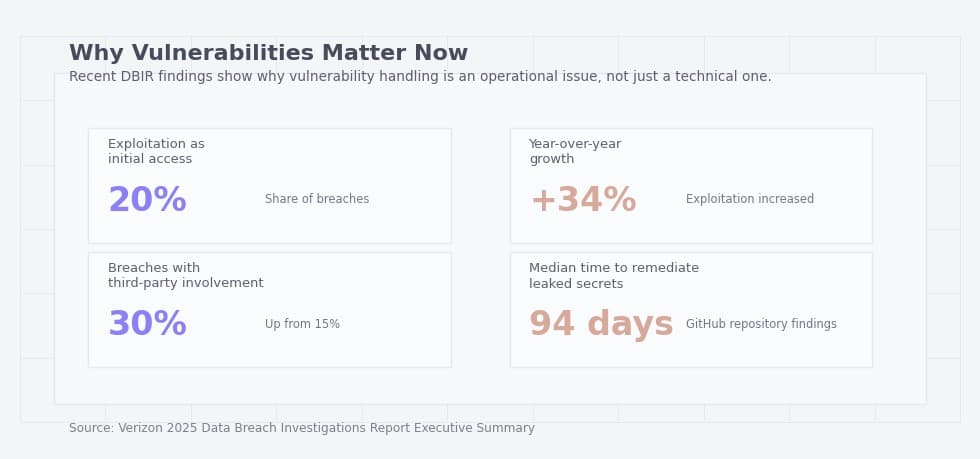
Recent breach data shows why vulnerabilities are more than a technical detail. Recent breach data shows that exploited vulnerabilities remain a common path to compromise, especially when patching and exposure management lag behind.
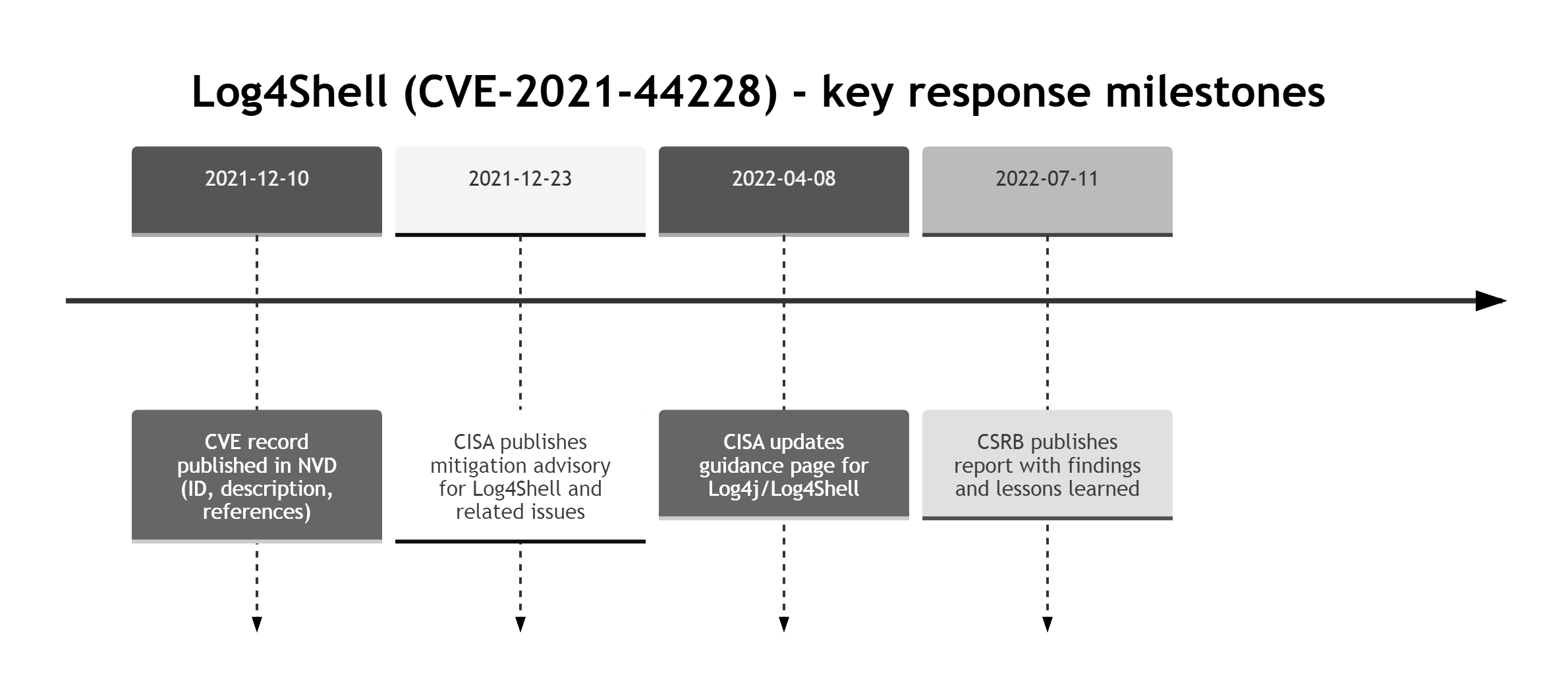
A well-known case is the Log4Shell vulnerability (CVE-2021-44228), where attackers exploited a flaw in the Log4j logging library to enable remote code execution on affected servers worldwide. This single flaw impacted major platforms and triggered global emergency patching.
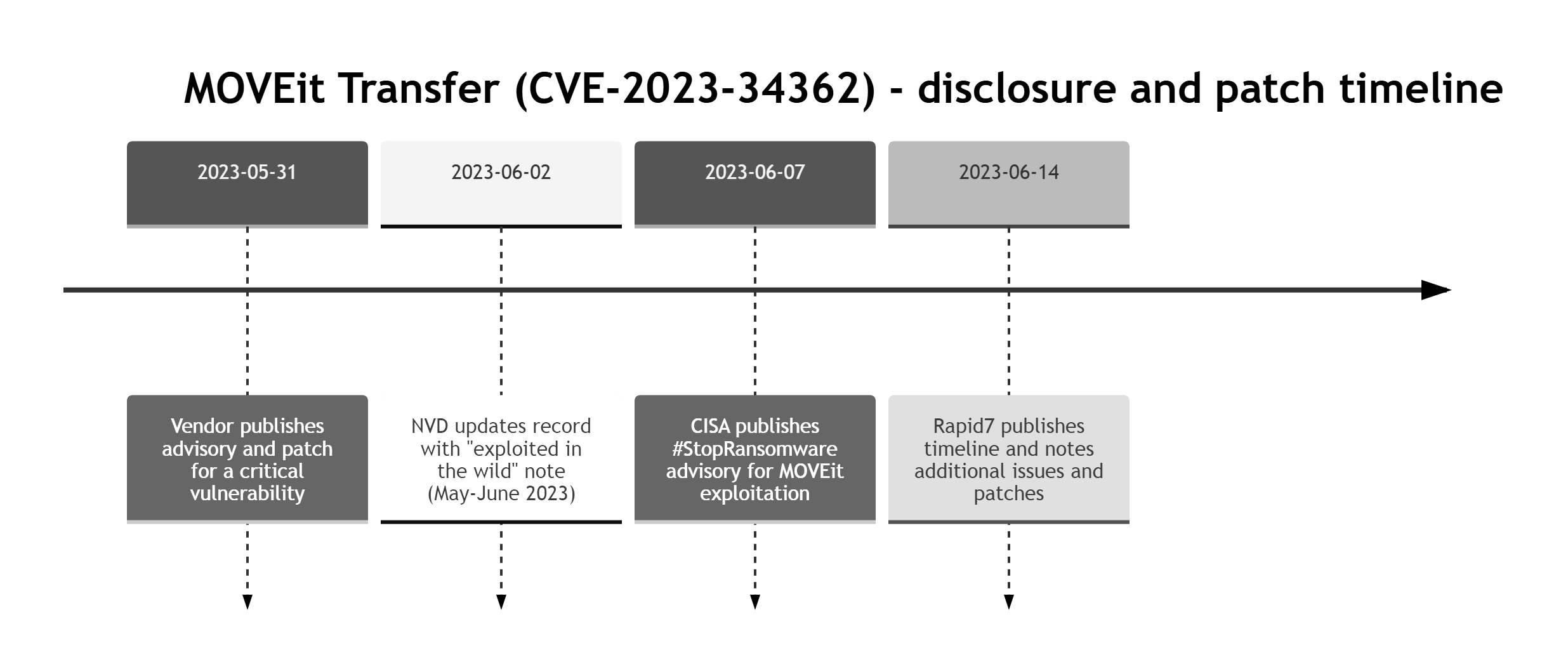
Not all vulnerabilities stem from code. In 2023, the MOVEit file transfer breach exposed data from governments and large corporations after attackers exploited a vulnerability in MOVEit Transfer. Attackers exploited the vulnerability to steal large amounts of data from affected environments.
What Is the Difference Between a Threat, Vulnerability, and Exploit?
The terms threat, vulnerability, and exploit are sometimes used interchangeably in vulnerability management, but they mean different things and have different implications:
- A threat is a potential cause of harm to systems or data.
- A vulnerability is a weakness in a system, application, or configuration that could be exploited.
- An exploit is a technique or code that takes advantage of a vulnerability.
Understanding these terms makes it easier to see how attacks happen and how they can be prevented. A threat creates risk, a vulnerability creates the opening, and an exploit is the method used to take advantage of it. Without a vulnerability (or another weakness to abuse), many threats cannot be realized.
|
Term |
Meaning |
Example |
Role in Attack |
|
Threat |
A potential danger to data or systems. |
Attacker trying to steal credit card data. |
The source of potential harm. |
|
Vulnerability |
A flaw or cybersecurity weakness in the system that can be targeted. |
Unpatched software with a known security bug. |
The weakness that can be exploited. |
|
Exploit |
The method used to abuse the vulnerability. |
Code or a technique used to trigger the weakness, for example an SQL injection payload. |
The method used to exploit the weakness. |
Example: a threat actor targets a public web app. The vulnerability is an unpatched SQL injection flaw. The exploit is the payload used to extract the database
If you want a quick mental model, use this simple chain.
Common Types of Cyber Vulnerabilities
Even minor flaws can become serious when they are exposed to attackers. Vulnerabilities may exist in software, networks, devices, people-driven processes, or system configurations. The earlier they are identified, the easier they usually are to fix.
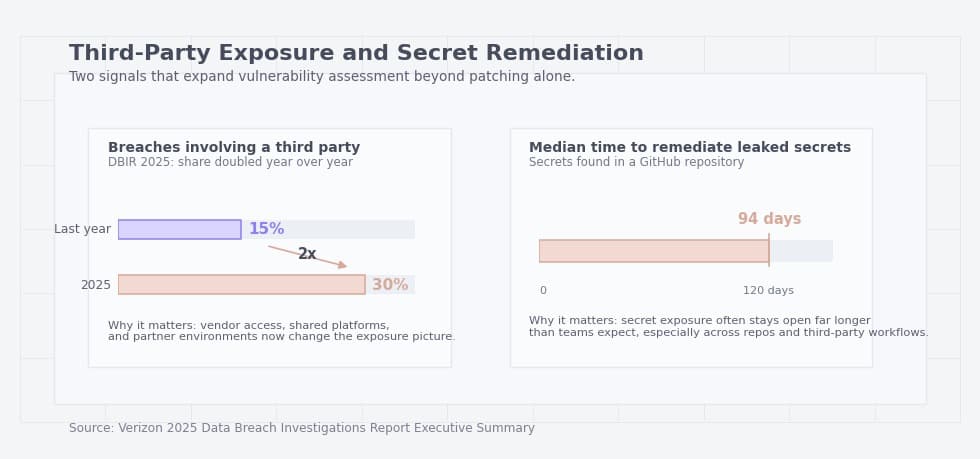
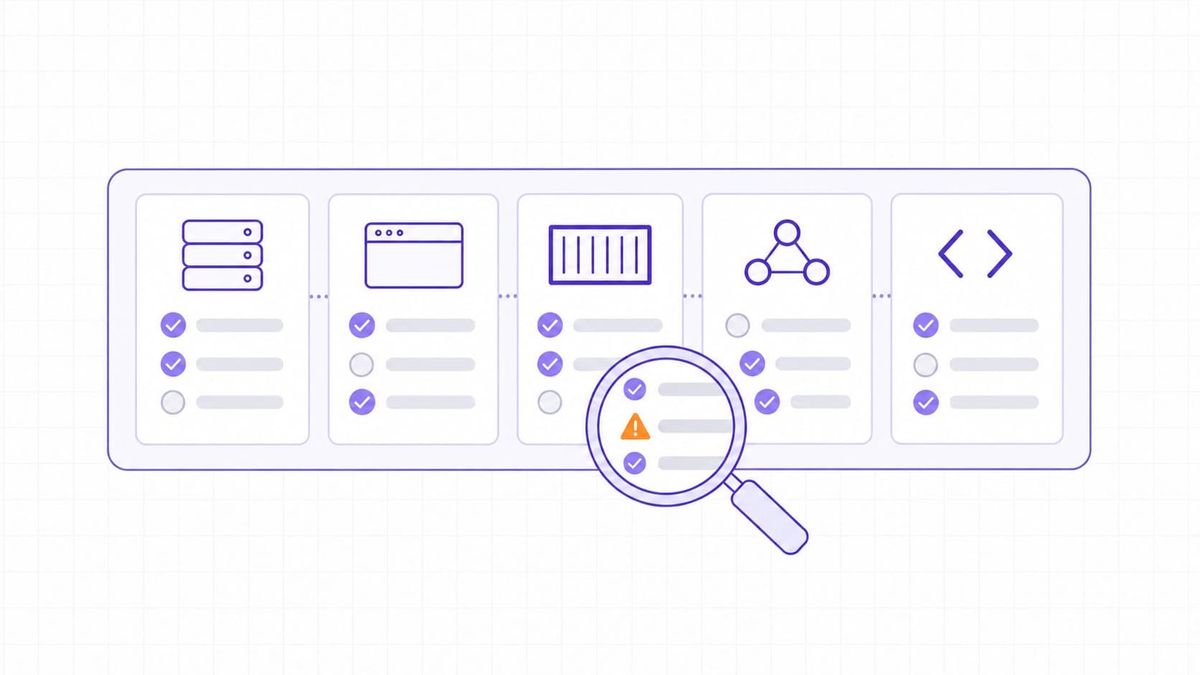
Table: Five common vulnerability types: examples, how they are found, and how they are usually fixed.
|
Vulnerability type |
Example |
How it is usually found |
How it is usually fixed |
Quick check |
|
Software |
Outdated library or component. |
SCA, vulnerability scanner, SBOM review. |
Patch or upgrade, temporary mitigation. |
Do we have an update SLA? |
|
Network |
Admin port exposed to the internet. |
Port scanning, EASM, firewall audit. |
Close port, VPN or Zero Trust access, segmentation. |
Which ports are publicly reachable? |
|
Human |
Phishing or weak password. |
Phishing simulations, email telemetry, IAM reports. |
MFA, training, block legacy auth. |
Is MFA enabled everywhere? |
|
Hardware |
Vulnerable device firmware. |
Asset inventory, vendor advisories. |
Firmware updates, replacement, isolation. |
Which devices are missing updates? |
|
Misconfiguration |
Public bucket or overly broad permissions. |
CSPM, IaC scanning, config reviews. |
Fix policies, guardrails, least privilege. |
Do configs get checked before prod? |
Software Vulnerabilities in Cybersecurity
Software vulnerabilities are defects in applications, operating systems, or libraries that were not caught before release. If they are not fixed through patches or updates, attackers can exploit them. For example, a flaw in a web browser or operating system may let an attacker install malware without the user's consent.
Network Vulnerabilities
Network vulnerabilities appear when routers, firewalls, servers, or other network components are exposed or configured insecurely. Attackers can use these weaknesses to gain access, move laterally, or intercept traffic.
A common issue is exposing unnecessary ports or management interfaces to the public internet. If a business fails to secure and monitor its network, it becomes an easier target for attackers.
Human-Related Vulnerabilities
Not every vulnerability is technical. Human-related vulnerabilities include weak passwords, phishing, oversharing sensitive data, and risky access decisions. Even strong security controls can be undermined if someone clicks a malicious link or enters credentials into a fake login page. These errors are widespread, and attackers often exploit them because people can be easier to deceive than systems.
Hardware Vulnerabilities
Hardware vulnerabilities can stem from insecure device design, vulnerable firmware, default credentials, or undocumented backdoors. For example, a poorly secured camera or IoT device can become an entry point into the wider network.
If a device still uses default credentials, attackers may find it much easier to gain access and take control.
Misconfigurations
Misconfigurations happen when systems are deployed or maintained with unsafe settings because of mistakes, weak review processes, or missing guardrails. For example, making a private cloud storage folder publicly accessible can expose confidential documents to anyone on the internet.
These mistakes are common and often remain unnoticed until an incident happens. Even sophisticated systems can remain exposed if they are poorly configured or not reviewed regularly.
Operationalizing Vulnerability Management with TopScan
For most organizations, simply knowing that vulnerabilities exist is not enough. They also need a way to continuously find, prioritize, and fix them. This is where vulnerability management platforms such as TopScan come in.
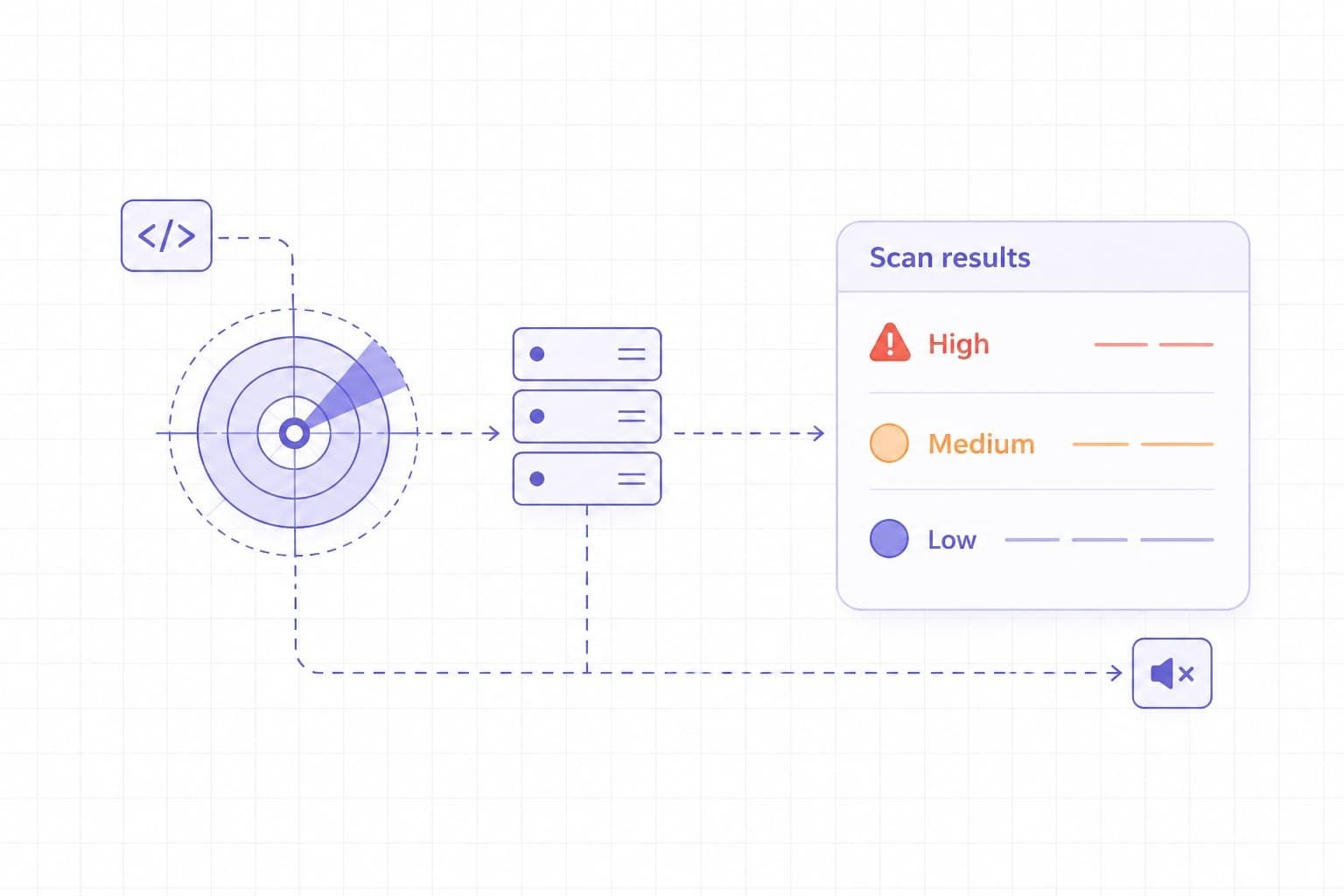
TopScan helps teams manage vulnerabilities across internet-facing assets. Users can add targets, run scheduled or ad hoc scans, track changes over time, reduce duplicate findings, and prioritize remediation based on exposure and business context. Integrations with ticketing systems and CI/CD pipelines help move findings into the workflows teams already use, making vulnerability management more consistent and repeatable.
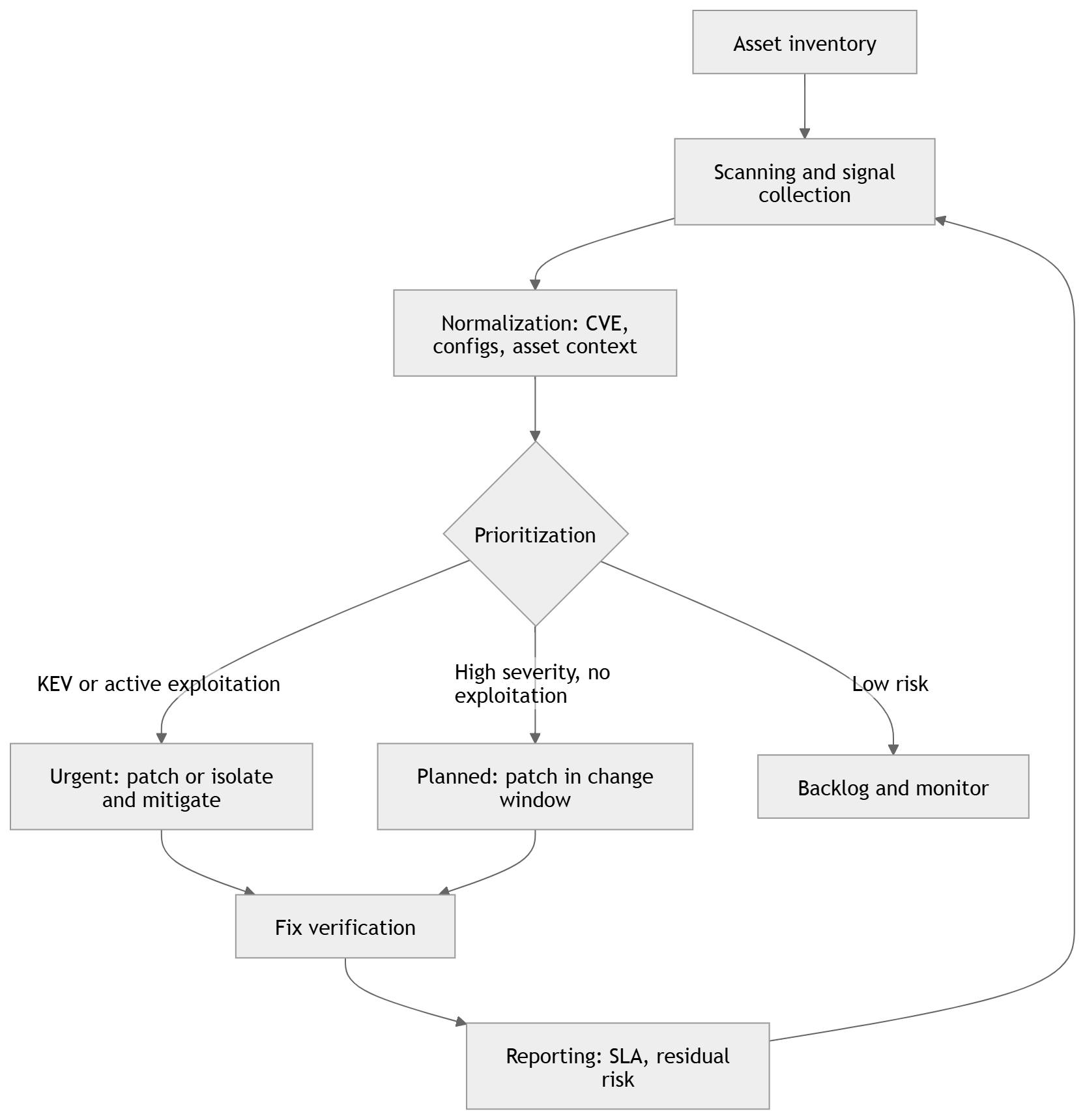
A simple vulnerability management cycle can run weekly or daily, depending on system criticality.
How Are Vulnerabilities Identified in Cybersecurity?
Knowing how to discover and fix vulnerabilities is a core capability for a cybersecurity team. Below are the main ways teams identify vulnerabilities in practice.
Security experts use a mix of manual testing and automated tools to find system vulnerabilities. Automated scanning is useful for speed and coverage, while manual testing is better at finding business-logic flaws, chained attack paths, and context-specific issues
Vulnerability Scanners
These tools scan systems automatically and detect known vulnerabilities and configuration errors. They work by matching system data against databases of known vulnerabilities, including CVE records.
Common vulnerability scanners include:
- Nessus. A widely used scanner that detects a broad range of known vulnerabilities and misconfigurations.
- Qualys. A cloud-based service used for continuous scanning and compliance checks.
- OpenVAS. An open-source scanner that detects a wide range of known vulnerabilities.
|
Tool |
Deployment model |
Best at scanning |
What to watch for |
|
Tenable Nessus |
Self-hosted scanner you deploy on your own platform. Tenable positions it as deployable across many platforms. Agentless remote scanning, with optional secured credentials for deeper checks. |
Network and host vulnerability assessment with deeper local exposure detection via authenticated credentialed checks. Broad coverage via a large plugin library with frequent updates. |
Unauthenticated scans can rely on banner information that may be inconclusive or wrong, so plan for credentialed scans and credential management. Results and coverage also depend on plugin and feed updates, so keep them current. |
|
Qualys VMDR |
Cloud platform with sensors, including scanner appliances for network-based scanning, whether virtual or physical, and Cloud Agents for continuous visibility. |
Vulnerability and configuration assessment across a broad attack surface, plus asset discovery and prioritization features inside VMDR. Patch detection and CVE correlation are explicitly part of VMDR positioning. |
Internal network IP scanning requires scanner appliances placed where they have reachability, so plan placement, routing, and permissions early. Decide upfront where you want agent-based coverage versus appliance-based scanning, because it affects rollout and visibility. |
|
OpenVAS / Greenbone |
Self-hosted, feed-driven scanner. You can run the Greenbone Community Edition via Docker containers, and Greenbone also offers an OpenVAS Free entry-level virtual appliance that uses the Community Feed. Coverage varies by feed, including Community and Enterprise options. |
Authenticated and unauthenticated testing across many protocols, with vulnerability tests delivered through a feed that is updated daily. It is a good fit when you want a self-hosted network vulnerability scanner and can maintain the stack. |
The Community Feed provides basic coverage and may not include checks for some enterprise products and certain compliance content, so expectations and scope matter. OpenVAS Free is positioned as an entry-level option with limited functions, so it may be restrictive for production use. |
These tools help identify outdated software, weak credentials, exposed ports, and missing patches.
Examples from the CVE Database
The CVE database lists real-world examples of vulnerabilities that have been reported globally. A CVE entry confirms that a flaw has been documented, but it does not by itself tell you whether your environment is reachable, exploitable, or already protected by compensating controls. These entries usually include:
- A unique ID (for example, CVE-2024-5678)
- A short description of the flaw
- The affected systems or software
- Severity information and references to fixes or mitigations
By matching scan results against this database, organizations can identify affected assets and estimate severity.
Final Words
In cybersecurity, a vulnerability is a weakness that attackers can use to gain access, steal data, or disrupt operations. Vulnerabilities may come from software flaws, insecure configurations, exposed services, weak credentials, or human error. That is why it is important to understand what a vulnerability is and how it can be exploited.
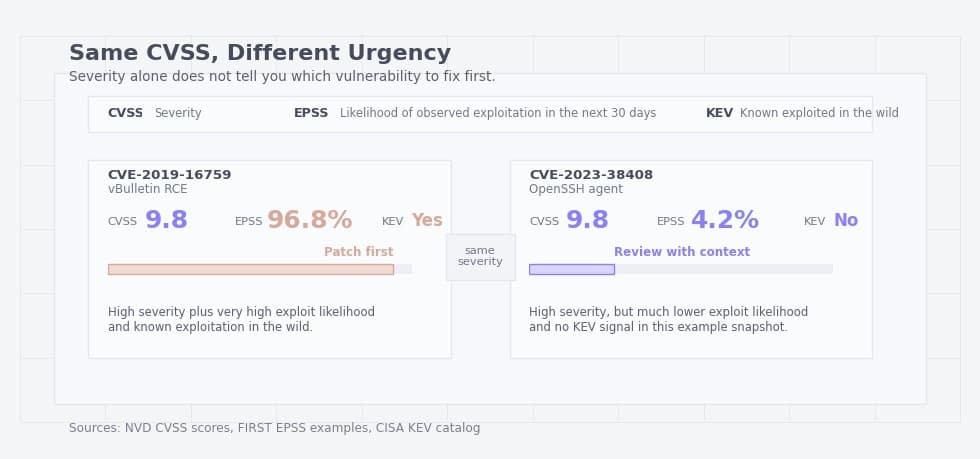
Many risks can be reduced with regular scanning, patching, access control, and user awareness, but no system is ever completely free of vulnerabilities. Early detection and timely remediation can reduce the risk to your data and systems. A disciplined process for finding, prioritizing, and fixing vulnerabilities is what keeps risk under control.