
Web Application Security Testing
Your web app is the part of your company an attacker meets first. Topscan tests it from the outside the way they would — on a schedule, behind the login too — and hands your team findings it can verify and fix, each with a deadline. No source code, no agents, no security hire.
14 days of the full Advanced plan · no card required · first results in 5–10 minutes
- Standard scan: 5–15 minutes
- OWASP Top 10 on demand
- Behind the login too
- Evidence on every finding
what every web application target gets — on every paid plan
Security Challenges
Every Team Faces
What happens in practice
The pentest was in March. The app has shipped forty releases since
The scanner stops at the login page — and everything that matters is behind it
The report arrives as three hundred raw items, and nobody has a week to triage them
Nobody wants to point an attack tool at production, so the check never runs at all
Security has no owner: it's the CTO's job in between everything else
How Topscan handles it
Scans run on a schedule you set, so every release gets checked — not just the one before the audit
Supply credentials once — a login form, HTTP Basic or a session cookie — and the deep scan tests the logged-in app as well
Findings arrive ordered CRITICAL to LOW, each with the affected URL, the fix and a remediation deadline
The standard scan observes and fingerprints; active OWASP checks are a switch you turn on, when and where you choose
One owner runs it, the whole team reads it — unlimited users on every paid plan
How Web Application Testing Works
Step 1
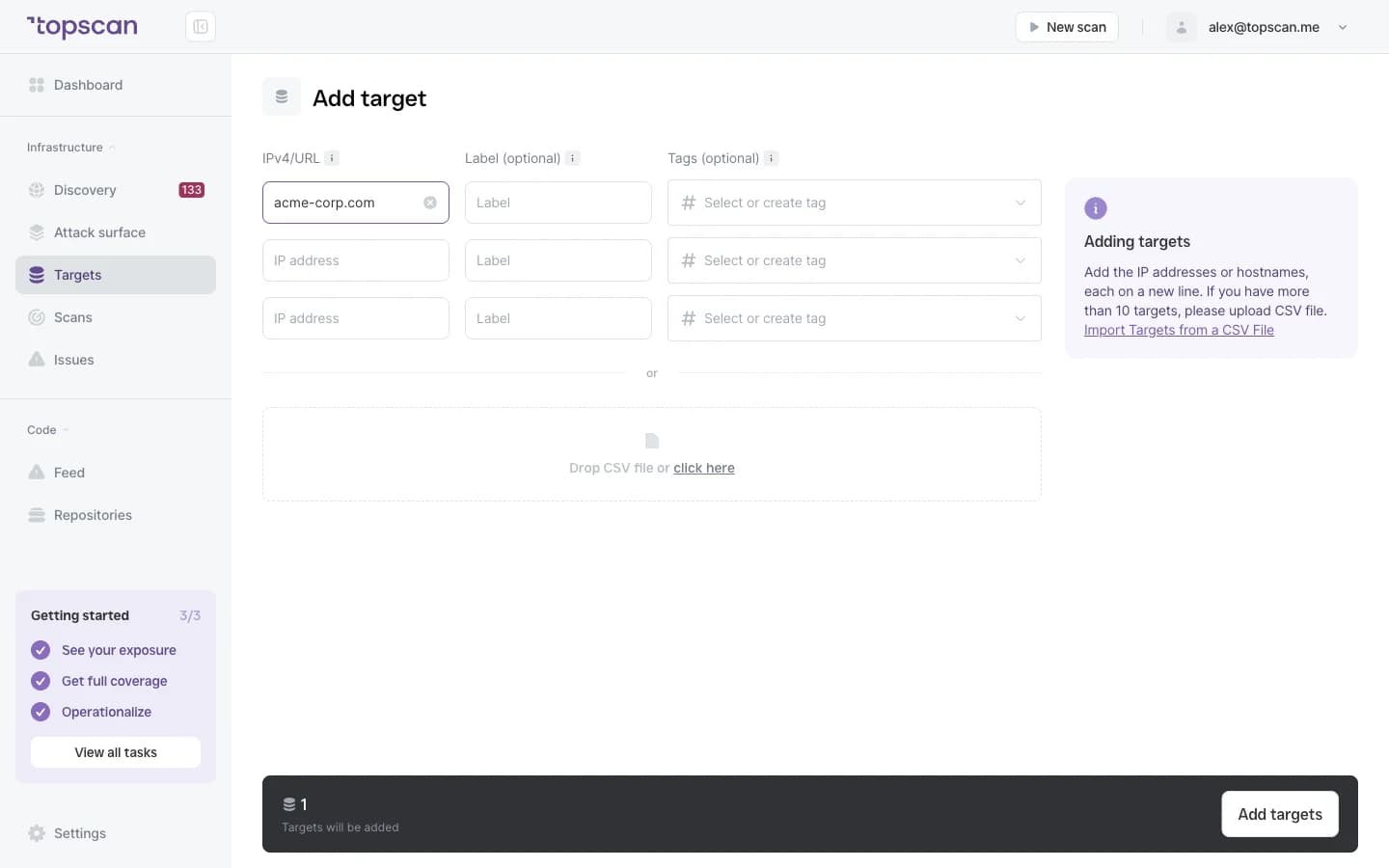
Add the URL and get a first answer in minutes
Enter the address of your running application. Topscan recognises it as a web application target, and discovery maps the rest of your footprint around it — subdomains, staging boxes and services nobody wrote down — so you can confirm what else deserves a look.
The standard scan takes five to fifteen minutes: open ports and service versions, known vulnerabilities in the software behind the app, exposed admin panels and login pages, insecure HTTP headers, directory listing, TLS problems. Nothing is exploited at this stage.
- A URL, no code access
- Type detected automatically
- 5–15 minutes
- Observes, doesn't exploit
Step 2
Switch on deep testing when you’re ready
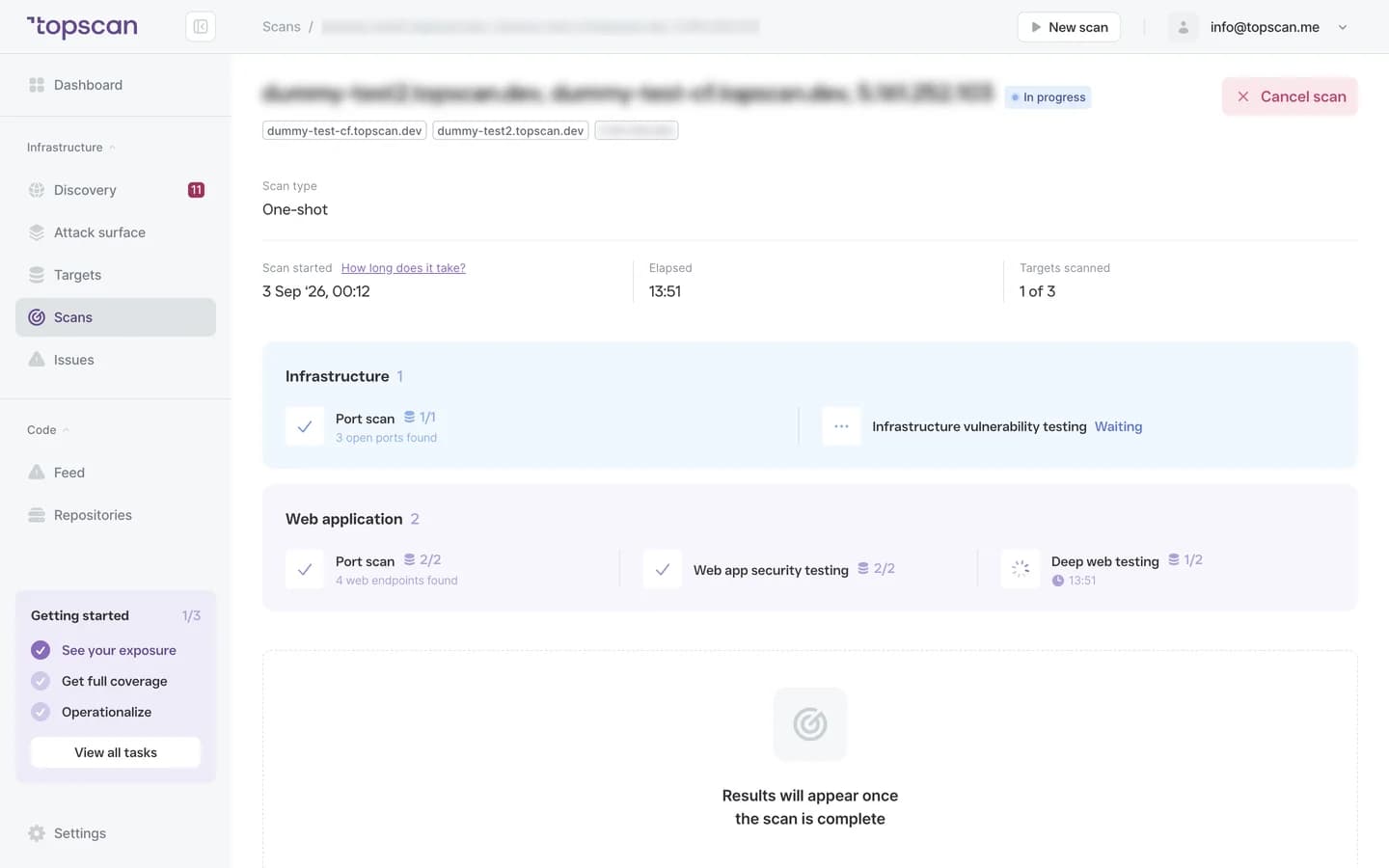
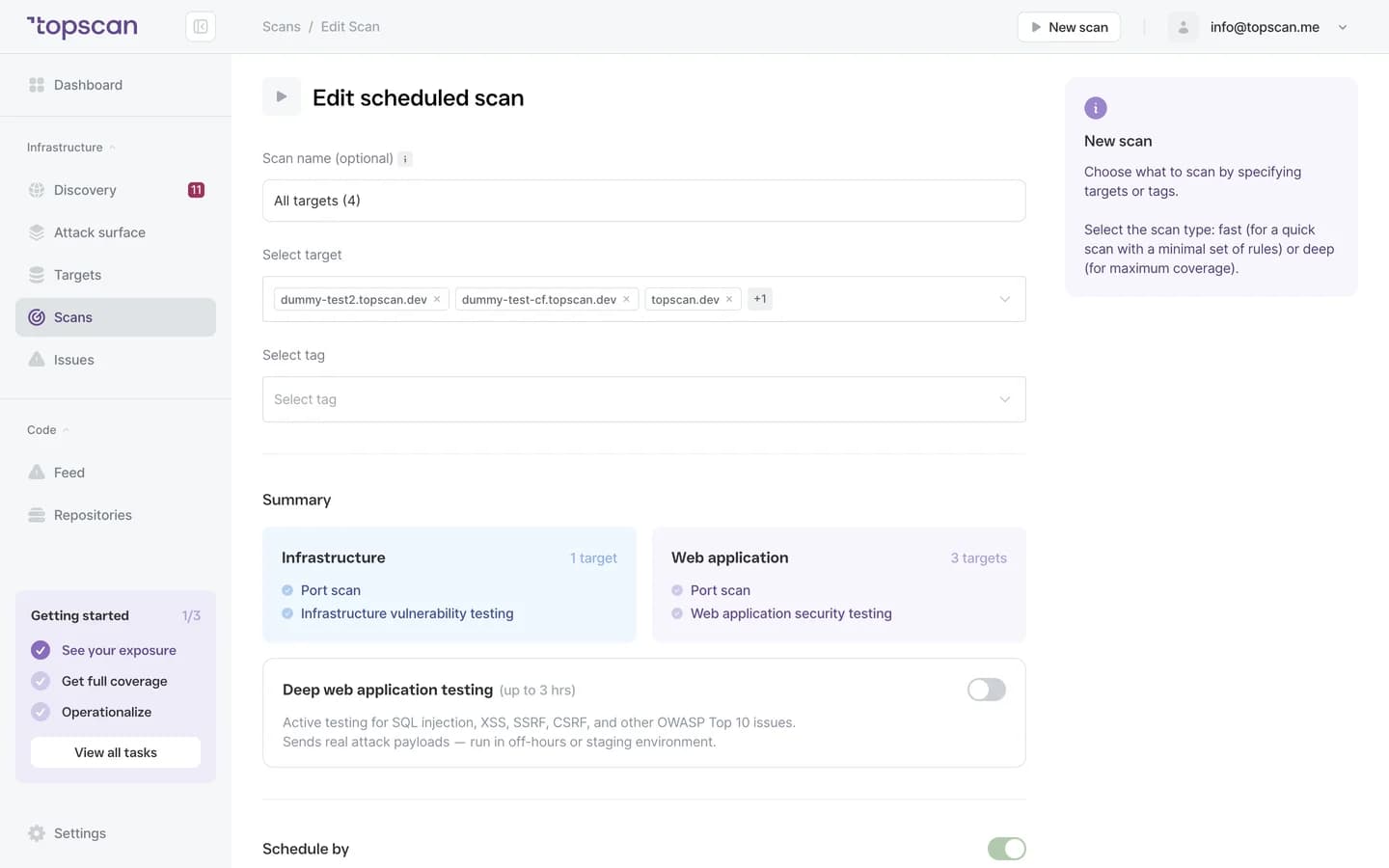
Deep web application testing crawls the app and actively tests it for OWASP Top 10 issues — SQL injection, cross-site scripting, SSRF, CSRF and more. It sends real attack payloads, which is why it's a switch you turn on rather than the default: run it against staging, or against production in off-hours.
Expect one to three hours per application. Put it on a schedule — weekly, or before a release — and it becomes routine rather than an event.
- OWASP Top 10
- SQLi · XSS · SSRF · CSRF
- 1–3 hours
- Scheduled or one-shot
Step 3
Test what’s behind the login
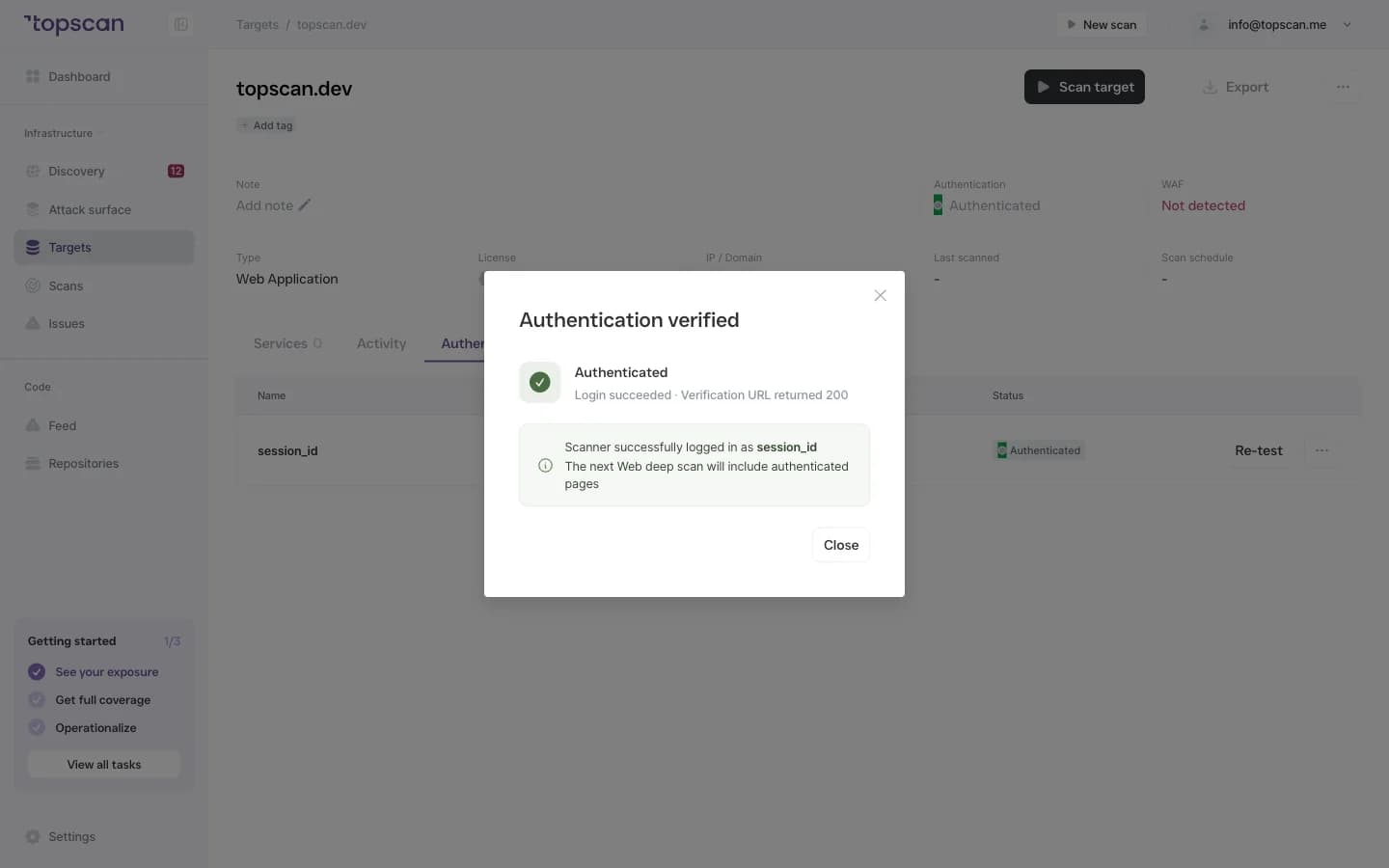
Most of a SaaS product lives behind authentication — dashboards, admin areas, billing — and that is exactly what an unauthenticated scanner never sees. Give Topscan credentials once per application: a login form, HTTP Basic, or a session cookie copied from your browser.
Save & Test confirms the login works before any scan runs. During the deep scan the session is tracked and re-established if it drops, the logout URL is kept out of the crawl, and credentials live in an encrypted vault — never in results, logs or exports.
- Form login
- HTTP Basic
- Session cookie
- Verified before the scan
- Encrypted vault
Step 4
Fix in order, prove it, move on
Every finding names the affected URL and target, carries a severity with its CVSS score and exploit likelihood, explains what happens if it's left open and how to fix it. Findings are ordered CRITICAL to LOW, and each gets a remediation deadline from the day it was first seen — 7 days for CRITICAL, 30 for HIGH.
Send a finding to Jira in one click, snooze what you accept, mark false positives. The next scan closes what's fixed with a date and reopens what came back. A PDF report and a Security Score turn that into something you can hand a customer or an auditor.
- Affected URL & severity
- CVSS & exploit likelihood
- How to fix
- SLA deadline
- Jira in one click
- PDF report
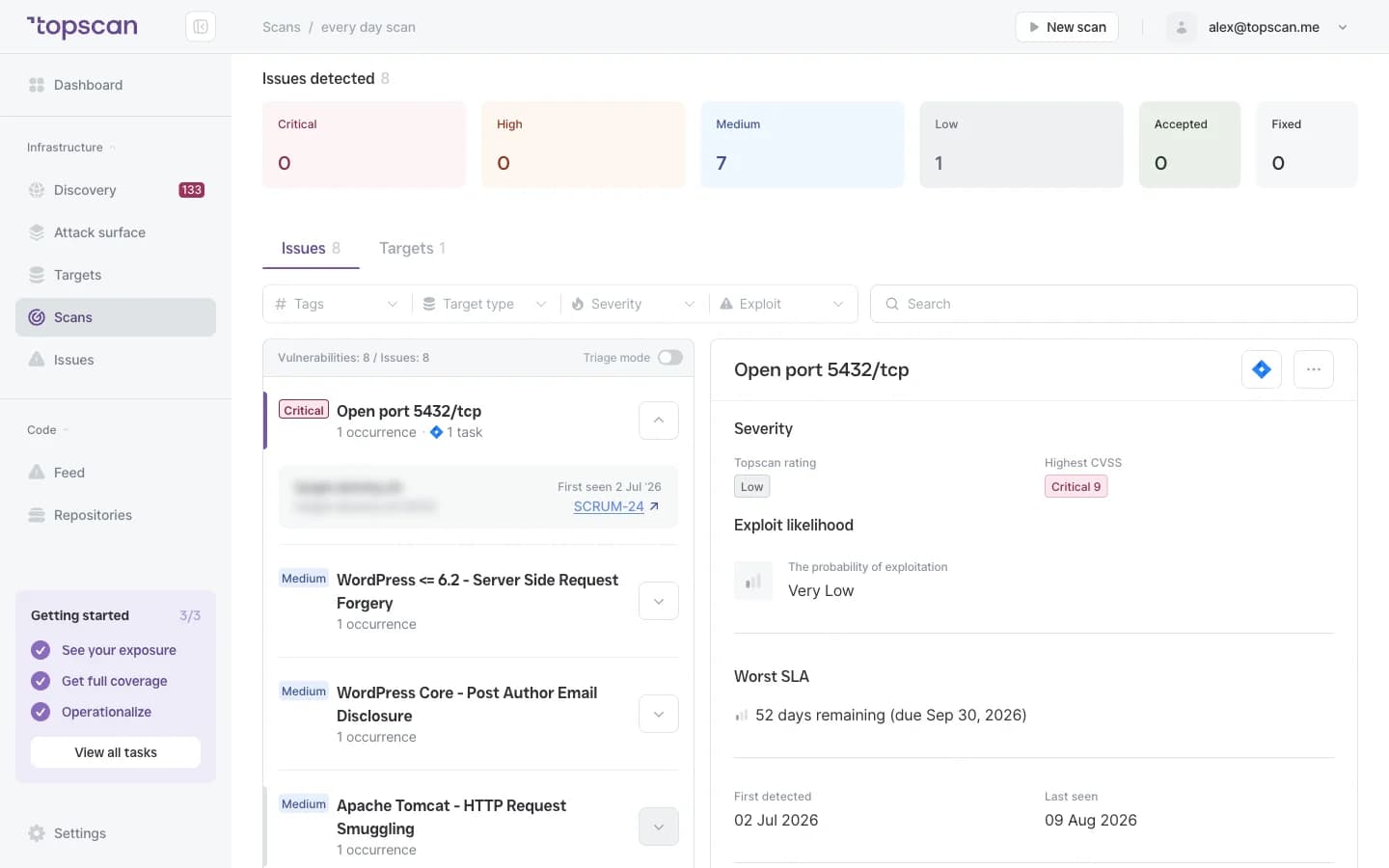
Features & Capabilities for your web apps
Two depths, one switch
A standard scan every time — ports, versions, known vulnerabilities, exposed panels, headers, TLS — in minutes. Active OWASP Top 10 testing when you choose, where you choose. Scans are never billed, so weekly costs the same as monthly.
Authenticated coverage
A login form, HTTP Basic or a session cookie, verified with Save & Test before the scan. The scanner logs in only where you asked it to and never tries to get past authentication it wasn't given.
Findings an engineer can act on
The affected URL, a severity with CVSS and exploit likelihood, what an attacker could do, and the specific fix. Ordered CRITICAL to LOW, deduplicated across scans, with the first-seen date and a remediation deadline on each.
From a scan to a process
Schedules, a webhook that triggers a scan from your deploy script, alerts in Slack or Microsoft Teams, tickets in Jira, snooze and false-positive handling, a Noise tab that keeps informational findings out of your feed — and one Security Score to report upward.
Who Topscan Is Built For
CTO at a SaaS company
Your customers' data sits behind your login. Get the logged-in app tested on a schedule and a clear answer to «what's exposed right now» — without hiring for it.
Head of DevOps
Wire a scan into the release routine: a standard check on every deploy through the webhook, a deep run against staging before a major release.
Engineering teams shipping weekly
Findings land where the work happens — Jira, Slack, Teams — with the URL, the fix and a deadline. No scanner export to translate.
Teams answering security questionnaires
Enterprise customers and auditors ask when the app was last tested and what happened next. Scan history, remediation records and PDF reports answer that with dates. Your auditor should confirm applicability.
Findings go where your team already works
Trigger a scan from your deploy script, get new CRITICAL and HIGH findings in Slack or Microsoft Teams, and turn a finding into a Jira ticket in one click.
 GitHub
 GitLab
 Slack
Slack Microsoft Teams
 Jira
Jira AWS
AWS- CI/CD webhook
Fair pricing for your web apps
Standalone DAST tools start at around $140 a month for the scanner alone. Here a web application is a $45 licence, the first one is in every paid plan, and the perimeter, the code and the workflow around it come with the same subscription.
Basic
$129/ month
For small teams without cloud infrastructure — one DevOps or CTO who owns security among other things.
- 1 web application — standard and deep testing, scans behind the login
- 3 infrastructure hosts — an IP, a hostname or a subdomain
- 10 repositories scanned by SAST
Advanced
14 days free trialBest value$269/ month
For companies of 20–60 with AWS infrastructure and active CI/CD.
- 2 web applications, 8 infrastructure hosts, 20 repositories
- Slack, Microsoft Teams and Jira routing for findings
- AWS integration — cloud assets discovered automatically
Pro
$449/ month
For companies of 30–100 with mature DevOps, first enterprise customers and audit requirements.
- 15 infrastructure hosts, 4 web applications, 40 repositories
- Custom SLA by severity and per target, Severity Override with an audit trail
- Two-way CI/CD webhook and Attack Surface change tracking with alerts
You pay for what you monitor — not for seats, scans or findings
Discovery costs nothing: it maps your whole footprint and a licence is used only when you put a host under monitoring. Scans are never billed, so a weekly schedule costs the same as a monthly one, and the whole team reads findings on any paid plan — developers, whoever tracks remediation, and read-only seats for auditors.
In every paid plan
- External infrastructure scanning
- Static code analysis, all supported languages
- Remediation history with dates
- Role-based access control
- Attack Surface and Security Score
- Dependency scanning (SCA)
- CI/CD webhook to trigger a scan
- Unlimited scans and users
- Web application scanning
- Statuses, SLA and snooze on every finding
- Email alerts
- Free read-only seats for auditors
Walk through it before you sign up
Five clicks through the real product. No form, no demo call.
Step 1 · Add the URL
One address. Topscan recognises a web application and maps what surrounds it.
Step 1 of 5 — click the highlighted spot
FAQ
Topscan builds on the best in class scanning engines
Still have questions?
Contact usNo. TopScan tests the running application from the outside. No code access, no agents, and no infrastructure changes are required.
Yes. Provide credentials once, and TopScan covers logged-in paths including dashboards, admin panels, and authenticated user flows.
Web Fast delivers faster results and fits regular release cycles. Web Deep runs a broader assessment when deeper coverage is needed.
Each finding includes issue type, affected URL, severity level, and remediation steps — no raw scanner logs to parse.
Yes. Scanning history and remediation records help build the evidence base teams need for SOC 2 and ISO 27001 preparation — without a separate compliance workflow.
CTOs, DevOps leads, and engineering teams that own security work — typically at companies between 10 and 200 people.
Test your app the way an attacker will — this week, not at the next audit
Add one URL. The first results are in before the coffee is.
14 days of the full Advanced plan · no card required