A vulnerability assessment report documents security weaknesses found within a defined scope, the evidence behind them, their potential impact, and the recommended response. It should tell the reader which findings need attention first, who will address them, and how the organization will verify that the fixes worked.
A scanner export supplies part of that evidence. The assessment report adds the interpretation: whether a finding applies to the asset, what remains uncertain, and what action is justified. For a CTO or DevOps lead, this is the difference between receiving a list of alerts and having work ready to assign.
The Purpose and Limits of Vulnerability Reports
Vulnerability reports support remediation planning, engineering handoffs, management reviews, and audit evidence. They also preserve the boundaries of the assessment. A report covering public web services cannot establish the security of private databases, employee devices, or cloud permissions that were never examined.
Report preparation starts when the team agrees on scope and records evidence. The final assessment document follows analysis, while urgent findings should be escalated through the agreed channel as soon as they are identified. Waiting for the finished document can delay action on a serious exposure.
NIST SP 800-115, Section 8.2 describes reporting as a way to connect identified weaknesses with mitigation actions and communicate results to appropriate audiences. Its guidance also recognizes that different readers may need different report formats.
An assessment is bounded by its dates, access, methods, and coverage. Finding no vulnerabilities means none were identified by those checks within that scope. It does not establish that the environment is secure or that a future release will have the same results.
Scan, Assessment, Pentest, and VAPT Reports
Report names overlap, so read the scope and evidence before relying on the label. An information security assessment report or IT security assessment report may cover policies, processes, and control effectiveness as well as technical weaknesses. A security vulnerability report is narrower and may describe just one issue.
The following comparison shows what each deliverable lets a reader conclude.
|
Report |
Main Evidence |
Decision It Supports |
|
Vulnerability scan report |
Automated detections, target details, scan settings, timestamps, and scanner evidence. Validation may be limited. |
Which alerts need triage and which assets need further investigation. |
|
Vulnerability assessment report |
Findings reviewed for applicability, scope limitations, impact analysis, priorities, and recommended actions. |
Which weaknesses to address, in what order, and with what verification. |
|
Penetration test report |
Authorized testing, attempted attack paths, demonstrated outcomes, and explicit testing limits. |
What the tester could achieve under the engagement conditions and which controls need improvement. |
|
VAPT report |
Vulnerability assessment and penetration testing results, with the evidence from each method identified. |
How broad discovery and deeper testing inform a combined remediation plan. |
|
Vulnerability management report |
Findings and remediation records across reporting periods, including overdue, reopened, and accepted issues. |
Whether the ongoing program is reducing unresolved exposure and meeting its own deadlines. |
VAPT stands for vulnerability assessment and penetration testing. VAPT reports should identify which findings were detected, which were validated, and which were successfully exploited within the authorized scope. An automated scan alone should not be presented as evidence that penetration testing occurred.
For the underlying testing differences, see vulnerability assessment vs. penetration testing. The report should preserve those distinctions even when one document combines the results.
Vulnerability Assessment Report Template
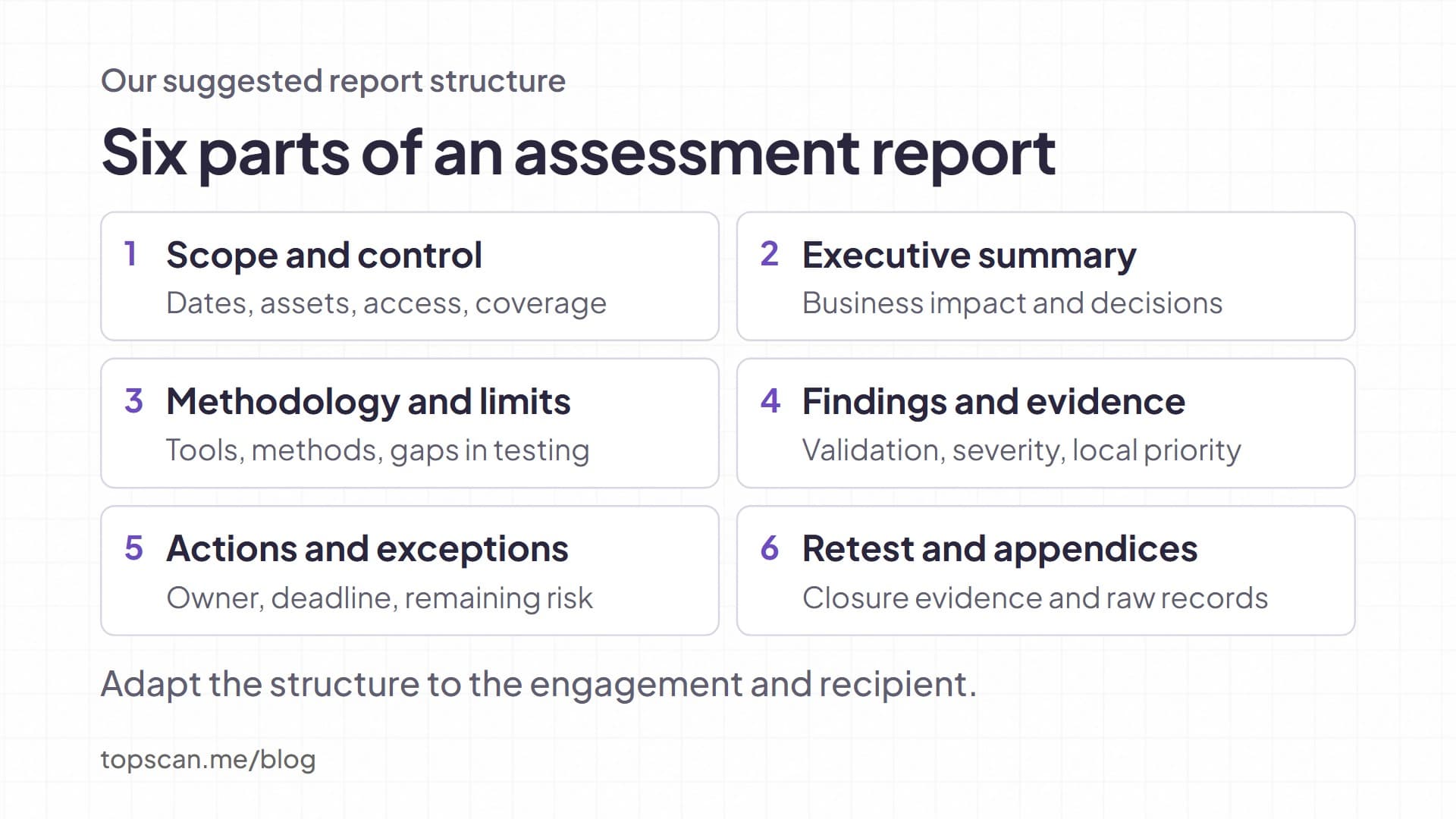
There is no single security assessment report format suitable for every engagement. The template below is an editorial starting point for a technical team: replace the bracketed fields, remove sections that do not apply, and retain any additional fields required by the recipient or assessment agreement.
Report Control and Scope
Report details: [organization], [report ID and version], [author and reviewer], [assessment dates and time zone], [issue date], [data cutoff], [classification], and [approved recipients]. Add a table of contents when the document is long enough to need one.
Scope statement: [assessment objective], [included asset identifiers and environments], [excluded assets or methods], [external or internal testing location], and [authorized testing boundaries]. Link the approved scope record where available.
Coverage statement: [assets planned], [assets reached], [assets successfully assessed], and [assets not assessed, with reasons]. Specify what counts as an asset. A hostname, an IP address, a cloud resource, and an application are different units and may overlap.
Adapt the evidence to the environment. Network findings need service and reachability details; web findings need routes and tested user roles. Cloud permission findings need account, resource, and policy context. An external network scan cannot establish whether an internal IAM policy grants excessive access.
Executive Summary
Use the summary to present the decision leadership needs to make. Explain the affected service and possible operational consequence in plain language, then identify the requested action or resource. Avoid declaring the whole organization safe or unsafe from one assessment.
Summary text to complete: "The assessment covered [scope] during [dates]. The highest-priority confirmed finding affects [service or business function] and could [supported consequence]. [Owner] will [action] by [agreed deadline]. [Limitation] remains unassessed and requires [follow-up]."
If you include severity totals, state whether they count unique vulnerability types, affected assets, or finding instances. Show pending validation separately. A management reader should not have to guess whether ten entries represent ten unrelated weaknesses or one weakness on ten servers.
Methodology and Limitations
Assessment record: [tools and versions], [scan profile], [check or feed update date], [scan IDs], [credentialed or uncredentialed access], [manual validation methods], and [relevant methodology version]. Record enough information to explain how the results were obtained.
Limitations: [failed authentication], [unreachable targets], [excluded checks], [blocked requests], [untested roles], or [testing windows that constrained coverage]. Describe the consequence of each gap. For example, failed authentication may prevent checks that depend on local package or configuration information.
Keep untested conditions visible. A test that did not run should not appear as a passed check.
The guide to vulnerability scanning explains how scan methods affect what can be observed.
Finding Records and Supporting Evidence
Use this vulnerability report template for each finding, with one stable ID linking the narrative, affected instances, and remediation ticket. Group repeated detections when they share a cause and fix, but preserve the individual assets and their verification results.
|
Field |
Content to Enter |
Why the Reader Needs It |
|
Identity and location |
[finding ID], [title], [asset ID], [host or URL], [port or route], [environment], [first seen], [last observed] |
Identifies the affected instance and supports follow-up across reports. |
|
Validation and evidence |
[confirmed, pending, or false positive], [method], [timestamp], [redacted observation], [restricted evidence reference] |
Separates observed behavior from an automated inference. |
|
Technical severity |
[rating], [scoring method and version], [CVSS score, vector, and source if used], [CVE where applicable] |
Makes the rating traceable and prevents unexplained numbers. |
|
Impact and priority |
[credible consequence], [exposure], [business importance], [relevant controls], [priority rationale] |
Explains why this issue belongs at its position in the work queue. |
|
Corrective action |
[specific fix], [vendor reference if applicable], [temporary control], [dependencies or change constraints] |
Gives the engineer an action that can be implemented and reviewed. |
|
Accountability and closure |
[owner], [ticket], [deadline], [status], [retest method and result], [remaining risk or approved exception] |
Shows who is responsible and what evidence is needed to close the issue. |
CVE means Common Vulnerabilities and Exposures. Include the identifier when it matches the affected product and issue; a local misconfiguration may have no applicable CVE. Do not assign a made-up identifier or score to fill a template field.
Put detailed raw exports in a controlled appendix or evidence store. The main report should make clear which observations have been reviewed and which still need validation. Separate uncertainty from confirmed impact rather than hiding it inside a severity total.
Remediation Plan and Exceptions
Action record: [finding IDs], [responsible owner], [agreed action], [ticket], [due date], [dependencies], and [verification criteria]. Tie recommendations to the actual cause; "improve security" does not give an engineer enough information to act.
Exception record: [decision owner], [reason for deferral or acceptance], [remaining exposure], [temporary controls], [review date], and [approval reference]. An accepted issue should remain distinguishable from a verified fix. Use deadlines from the applicable policy or obligation and document any justified override.
Retest Results and Appendices
Retest record: [finding ID and affected instance], [change applied], [test date], [tester or tool], [access and coverage], [result], and [evidence reference]. If the asset was unreachable or the relevant check failed, record verification as incomplete.
Appendices can contain the assessed asset list, scanner exports, configuration evidence, supporting advisories, and report revision history. Keep credentials, access tokens, and unnecessary personal information out of the distributed document.
Vulnerability Report Example With a Closure Test
The following entry is an illustrative vulnerability report example, not a customer assessment. It uses the directory-listing exposure described in OWASP Top 10:2021, Security Misconfiguration. The reserved example domain and finding ID are placeholders; no live target was tested.
Finding VA-001: Unintended directory listing. Affected location: files.example.com, route /exports/, production web service. Status: confirmed in this teaching scenario. Evidence: an authorized unauthenticated request returns a directory index containing filenames. Record the actual observation time and retain a redacted response or screenshot in a real assessment.
Impact and limits. The listing exposes filenames and may make unintentionally published material easier to discover. File contents, sensitive data exposure, and compromise have not been established by the listing alone. Severity and priority require assessment of the listed material, access controls, and service purpose; this example assigns no numeric CVSS score.
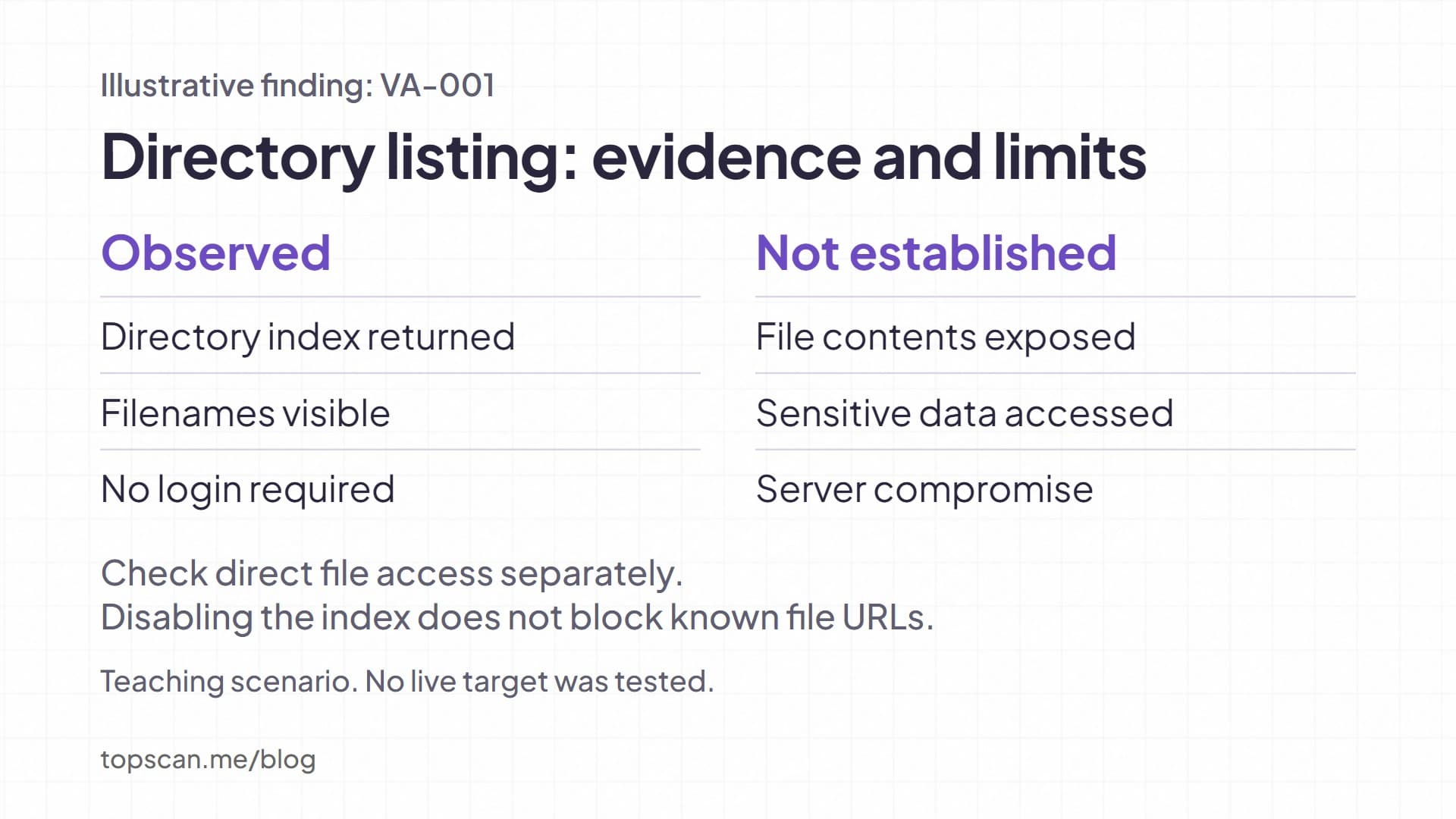
Recommended action. The web service owner should remove unintended files from the published location and disable unwanted directory indexing. For Apache HTTP Server 2.4, the Options directive documentation explains how Indexes enables listings and how option settings combine. Review the effective configuration before applying a change. Disabling the listing does not itself prevent direct access to known file URLs.
Ownership and closure. Assign the web service owner a tracked change and a deadline based on the confirmed exposure. Retest the directory route and any file URLs identified during authorized validation. Close the finding only when the unintended listing is removed and the relevant file access restrictions work. If the service is unreachable during retesting, verification remains incomplete.
This entry gives an engineer a specific change and a reviewer a specific closure test. It also avoids turning an observed listing into an unsupported claim that customer data was stolen.
Turning Findings Into a Prioritized Work Queue
Technical severity and remediation priority belong in separate fields. FIRST's CVSS v4.0 User Guide states that a CVSS Base score measures intrinsic severity and should not be used alone to assess risk. Preserve the score's version, vector, and source, then explain the local priority using asset context and relevant threat information.
Review findings in an order that makes the resulting assignments defensible:
- Check applicability and confidence. Confirm the affected component or configuration with a method allowed by the assessment scope. Keep unresolved detections pending instead of silently accepting or discarding them.
- Add exposure and business context. Identify who can reach the asset, which privileges are required, and what service or data depends on it. An open port is an observation; its significance depends on the service and access controls behind it.
- Assign the response. Select the fix or temporary control, name an owner, and record the deadline and any operational constraints. Make an exception visible when the default policy cannot be followed.
- Define verification before handoff. State the expected result of the retest so that completing a ticket and proving a fix do not become interchangeable.
For a deeper treatment of the ranking decision, see vulnerability prioritization.
Reporting Automation and Its Boundaries
Tools can assemble findings and evidence, but the export still needs review for scope, validation, and business context. Check the specific product edition and report settings rather than assuming every deployment provides the same output.
Burp Suite Professional can generate HTML reports for selected or all discovered issues and export issue data as XML. This supports web application reporting and custom processing. It does not make the output a network or cloud configuration assessment.
Greenbone GOS 24.10 documents several report formats, including CSV, XML, and PDF. Its recommended Vulnerability Report PDF format limits output to the first 500 results per host and shows a warning when results are omitted. Check those warnings before treating an export as complete. These details concern the documented GOS version and should not be assumed for every Community Edition deployment.
With TopScan, we bring dated scan records, affected assets, severity, and remediation status together, with PDF and CSV exports for reporting. Our security compliance reporting page explains how these records support report preparation and follow-up. You still need to confirm assessment boundaries and explain decisions that the collected evidence does not establish.
Before distributing any security assessment report, check that its filters, cutoff date, validation states, and totals agree. Restrict access to recipients who need the information, and use an approved secure delivery method. OWASP's reporting guidance recommends securing reports and addresses both technical and executive audiences.
Vulnerability Management Reporting Across Periods
A single vulnerability scanning report captures one run. Vulnerability management reporting follows what happened afterward and whether unresolved exposure is accumulating. Preserve stable finding and asset identifiers so that changing hostnames or repeat detections do not automatically create misleading trends.
For a recurring review, report these measures with their definitions:
- Coverage: Successfully assessed assets divided by planned in-scope assets for the period, with failed authentication and unreachable targets shown separately. State the asset unit and any scope change.
- Open and overdue work: Unresolved finding instances at the cutoff date, grouped by priority and age. Show approved exceptions separately so they do not disappear from the backlog.
- Verified fixes and reopened issues: Instances with successful verification during the period, plus issues detected again after closure. Explain the rule used to match a returning issue to its previous record.
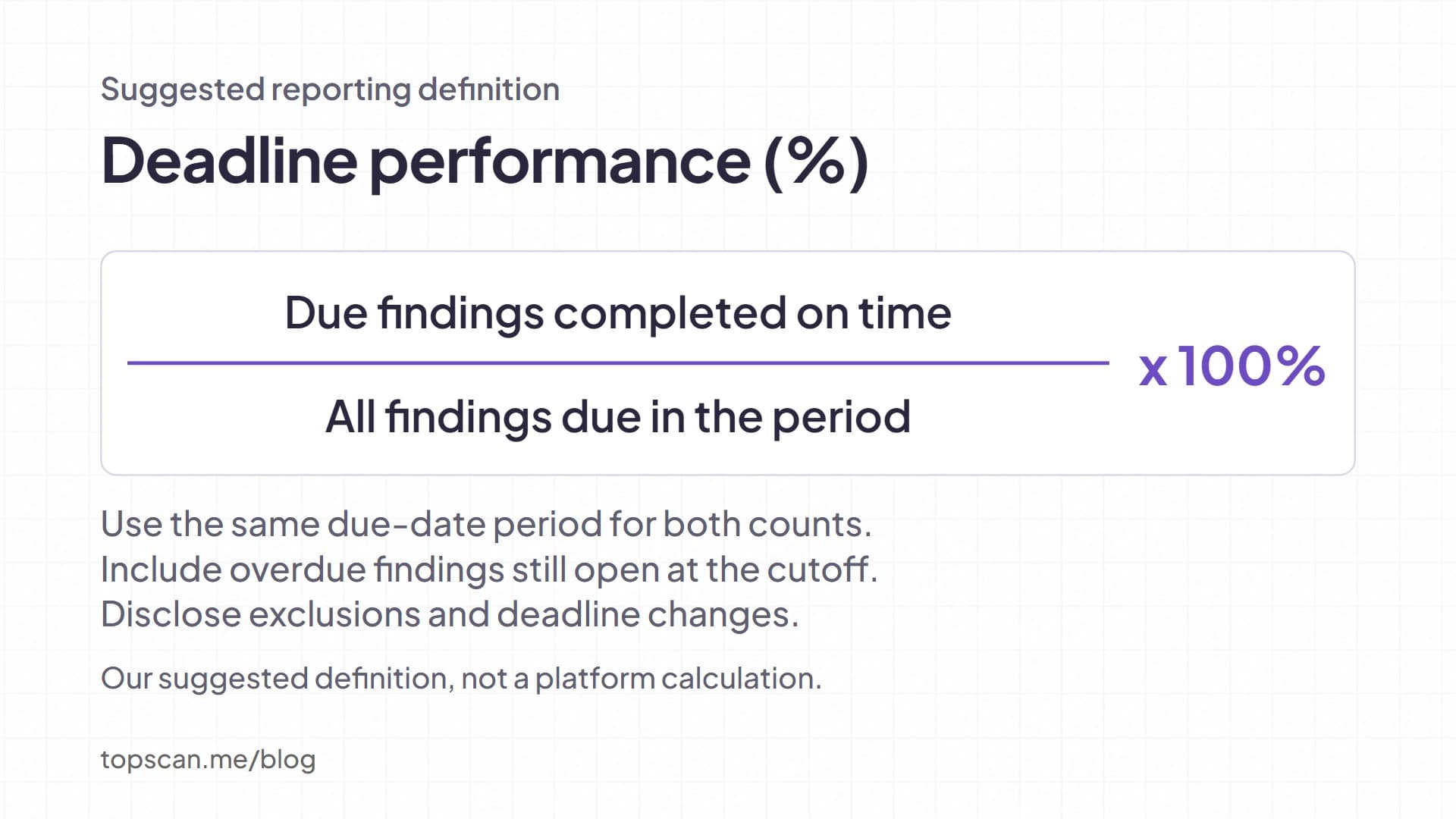
- Deadline performance: Findings completed by their deadline divided by all findings due in the period, including those still open after the deadline. Disclose exclusions and changes to due dates.
These are suggested reporting definitions, not universal formulas or claims about a particular platform's calculations. A higher finding count after adding assets can reflect wider coverage. A lower count after authentication failures can reflect lost visibility. Explain those changes before drawing a conclusion about security progress.
For teams using TopScan, its vulnerability management workflow describes issue states, remediation deadlines, and tracking of reopened issues. Keep any additional spreadsheet or ticket-based measures consistent with the underlying records.
Release the Report With Owned, Testable Actions
Before approving a report, have the technical owner review the evidence and limitations, and have a management reader check that the requested decisions are understandable. Reconcile the executive totals with the finding register and confirm that each priority issue has an owner and a next action.
TopScan editorial recommendation: For a small team, keep the main report focused on decisions and place detailed evidence in a restricted appendix. Expand the document when an external recipient, contractual deliverable, or complex assessment needs more detail. Brevity is useful only while the reader can still trace a recommendation to its evidence.