Patch management and vulnerability management solve different parts of the same security problem. Patch management controls the process of prioritizing, acquiring, installing, and verifying software updates. Vulnerability management has a wider scope: it finds weaknesses, evaluates their urgency, selects a response, assigns the work, and confirms that the exposure is closed or formally accepted.
The distinction matters because not every vulnerability has a patch, and not every available patch should be deployed to every system at the same moment. A misconfiguration may require a settings change. An unsupported product may need isolation or replacement. A patch for a business-critical system may need staged testing before deployment.
For a small security or DevOps team, the practical model is simple: use vulnerability management to decide what requires action, then use patch management when a vendor update is the right action. Both processes should return evidence to the same fix-and-verify workflow.
Patch Management and Vulnerability Management Defined
Patch Management
NIST defines enterprise patch management as identifying, prioritizing, acquiring, installing, and verifying patches, updates, and upgrades across an organization. Patches may correct security vulnerabilities, reliability problems, or functional defects. The security objective is to reduce exposure without creating unacceptable operational disruption.
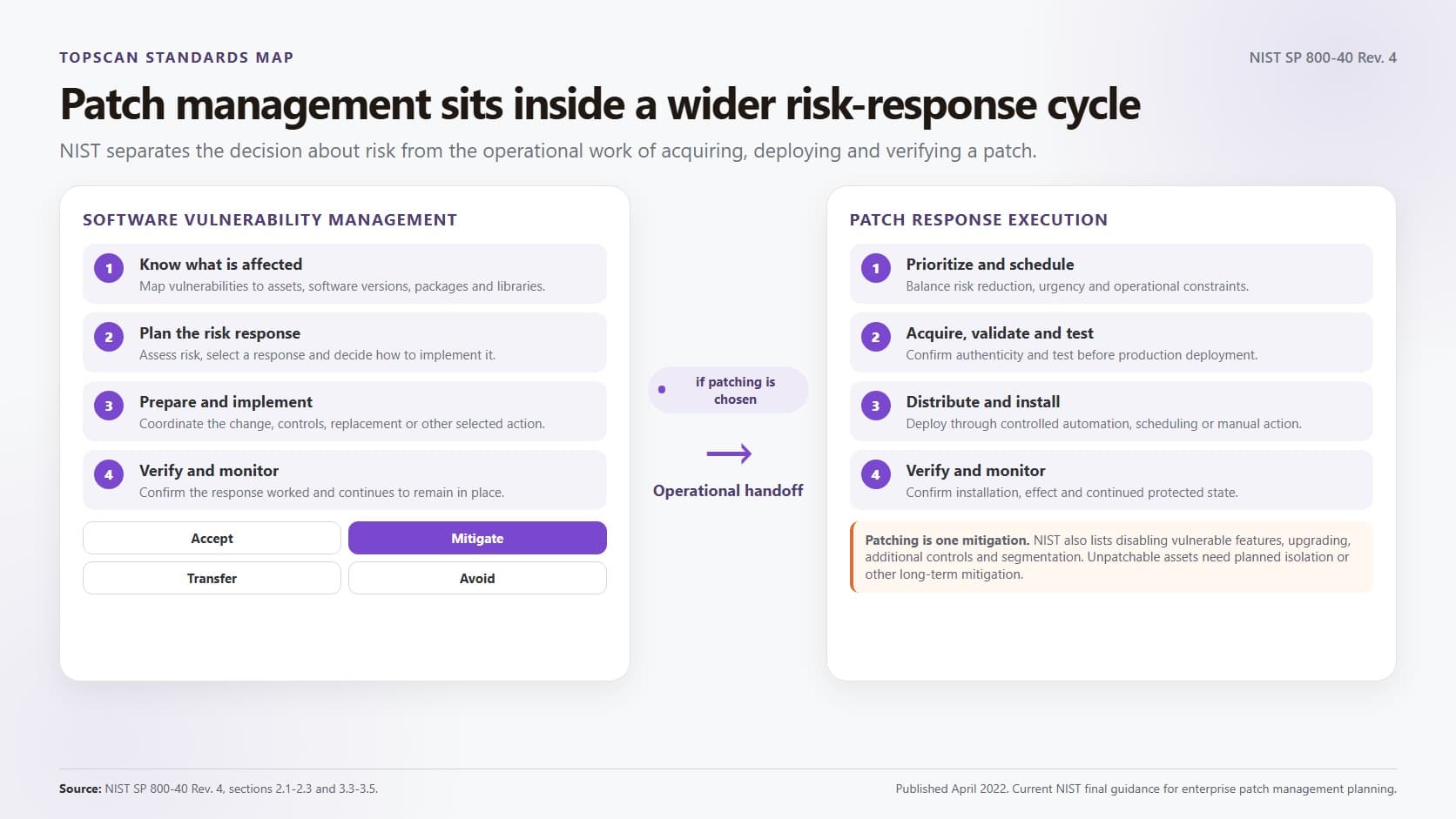
A complete patch process covers more than deployment:
- Identify applicable updates. Match vendor advisories and available patches to the products, versions, and assets in the environment.
- Set deployment priority. Consider active exploitation, internet exposure, asset criticality, patch availability, and the consequences of delaying or applying the update.
- Validate the package and test the change. Obtain the patch from a trusted source, confirm its authenticity, and test it against representative systems and dependencies.
- Deploy through a controlled path. Use scheduled, staged, or emergency deployment according to urgency and operational risk.
- Verify the result. Confirm the new version or configuration state, check for failures, and make sure the original vulnerability is no longer present.
Vulnerability Management
Vulnerability management is the broader cycle for discovering, validating, prioritizing, treating, and tracking security weaknesses. Inputs can include infrastructure scans, application testing, dependency analysis, cloud and configuration findings, vendor advisories, and threat intelligence.
The response is not limited to patching. A team may change a configuration, remove public access, disable a service, rotate credentials, add segmentation, apply a vendor workaround, replace an unsupported product, or accept the risk for a documented period. The decision should reflect the affected asset, attacker reachability, exploitation evidence, business impact, and existing controls.
Vulnerability scanning supplies evidence to this process, but a scanner report is not a vulnerability management program.
Our guide to how vulnerability scanning works explains what automated scans can detect and where validation and follow-up are still required.
Key Differences Between Patch Management and Vulnerability Management
The main difference is the decision being managed. Patch management asks how to deploy a specific update safely and prove that it took effect. Vulnerability management asks which weaknesses create meaningful risk and which response should be used for each one.
|
Decision Area |
Patch Management |
Vulnerability Management |
|
Primary question |
Which updates apply, when should they be deployed, and did installation succeed? |
Which weaknesses affect the environment, what should be addressed first, and what response will reduce risk? |
|
Scope |
Software, operating systems, firmware, packages, and other components that vendors or maintainers can update |
Patchable and unpatchable weaknesses across applications, infrastructure, cloud assets, configurations, identities, and exposed services |
|
Main inputs |
Vendor advisories, update catalogs, product versions, asset groups, deployment rings, and change windows |
Scan findings, asset inventory, CVE and CVSS data, exploitation evidence, reachability, business criticality, and control status |
|
Typical actions |
Test, approve, deploy, roll back, and verify an update |
Patch, reconfigure, restrict access, segment, disable, replace, mitigate, or accept risk with review conditions |
|
Common owners |
IT operations, endpoint, platform, infrastructure, and application teams |
Security and risk teams working with the technical owners who can change the affected assets |
|
Evidence of completion |
Installation status, target version, deployment failures, rollback results, and post-update checks |
Rescan or retest evidence, reduced reachability, confirmed configuration state, exception approval, and a closed or reassessed finding |
|
Useful measures |
Patch coverage, deployment success rate, failure or rollback rate, and time from approval to verified installation |
Asset coverage, time to remediate, overdue exploited vulnerabilities, recurrence, ownership gaps, and verified closure rate |
The ownership boundary is not absolute. In a small organization, one DevOps lead may coordinate both processes. In a larger environment, security may set risk priorities while several infrastructure and application teams carry out the changes. What matters is an explicit handoff, a named owner, and evidence that returns to the original finding.
How Patch Management Fits into the Vulnerability Lifecycle
Patch management usually enters the vulnerability workflow after a weakness has been validated and a software update has been selected as the response. The full sequence should remain connected:
- Build and maintain asset scope. Record systems, applications, versions, owners, exposure, and business criticality. An update cannot protect an asset that the organization does not know it operates.
- Find and validate weaknesses. Use suitable assessment methods, remove duplicates and false positives, and confirm that the finding applies to a live asset. A broader vulnerability assessment turns scanner output into evidence for remediation decisions.
- Prioritize the response. Use CVSS as a technical severity signal, then add known exploitation, reachability, asset importance, and compensating controls. The distinction between identifiers and severity scores is covered in CVE and CVSS guide.
- Choose the treatment. Patch when an applicable update provides the safest effective fix. Use configuration changes, access restrictions, isolation, vendor workarounds, replacement, or time-limited risk acceptance when patching is unavailable or unsuitable.
- Test and deploy the change. Match the deployment method to the urgency and operational consequence. Emergency action may be justified for an exploited internet-facing flaw, while a critical production system may need a short-staged rollout with rollback capability.
- Verify and close the finding. Check installation state and retest the original weakness. For public services, an external rescan may be needed even after an internal tool reports success. The guide to internal and external vulnerability scanning explains why the two views provide different evidence.
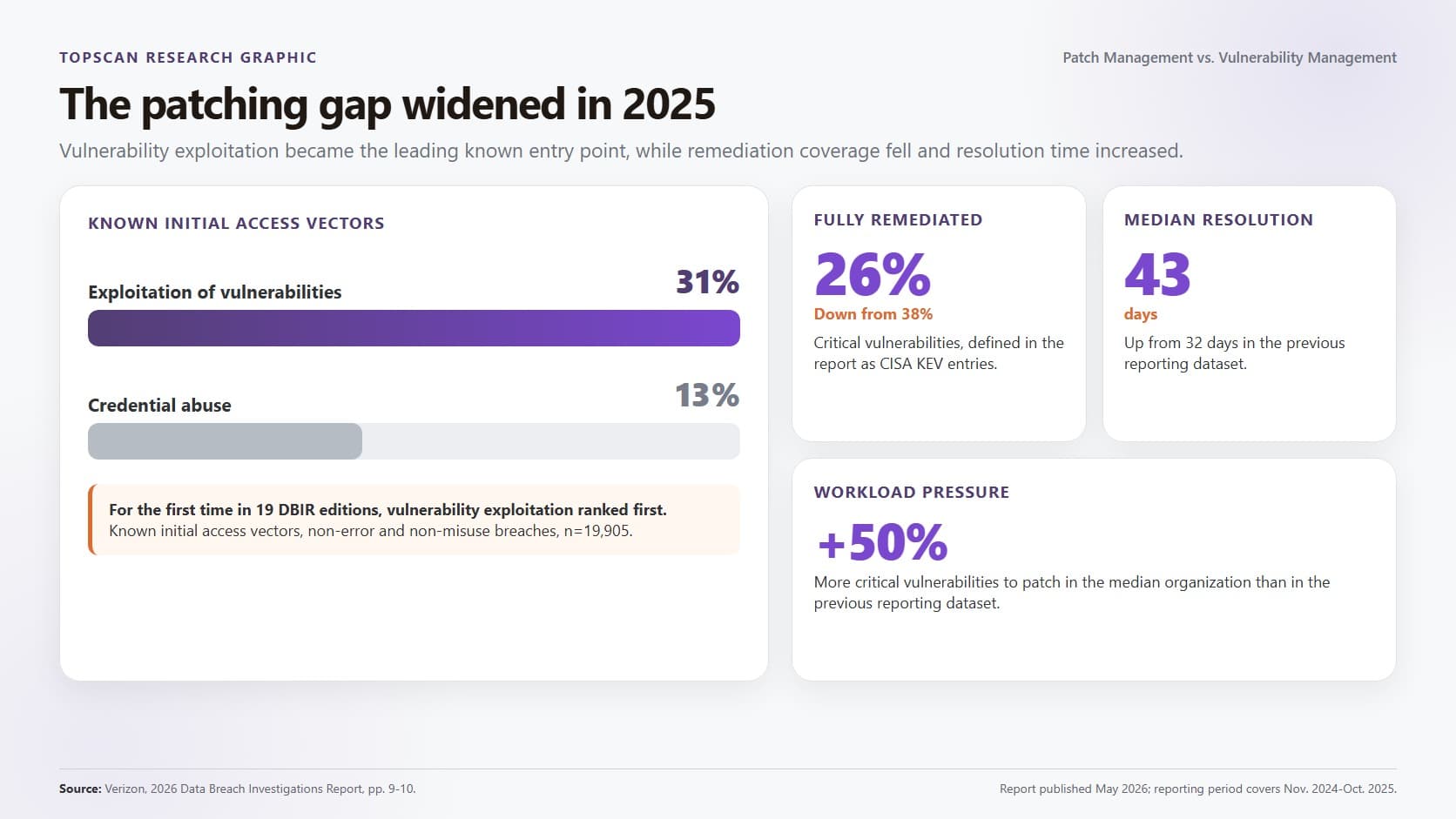
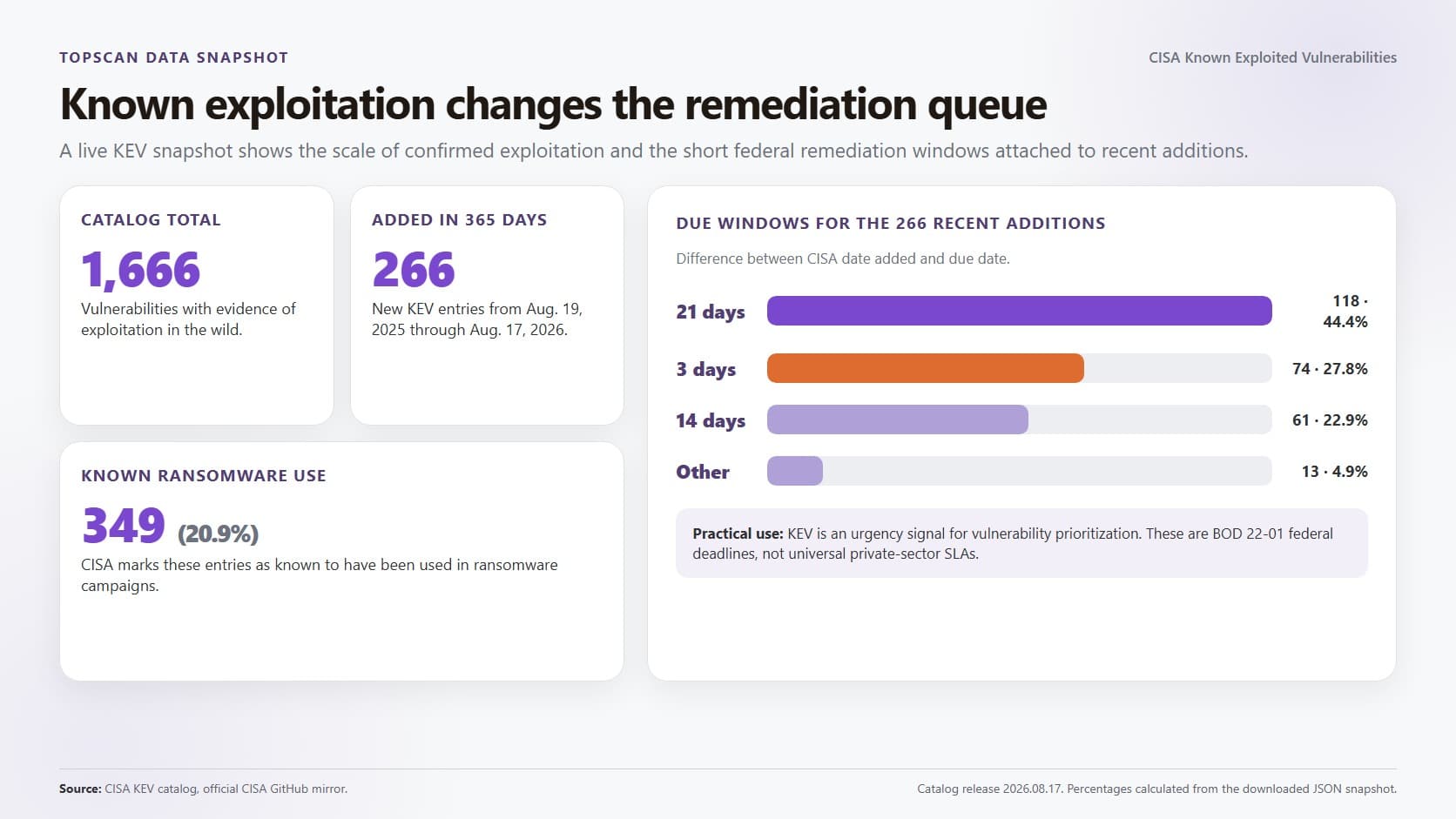
CISA describes its Known Exploited Vulnerabilities Catalog as an authoritative list of vulnerabilities exploited in the wild and recommends using it as an input to prioritization. A KEV entry does not remove the need for asset validation or safe change control, but it is stronger urgency evidence than a severity score alone.
The Equifax Breach Shows Why Handoff and Verification Matter
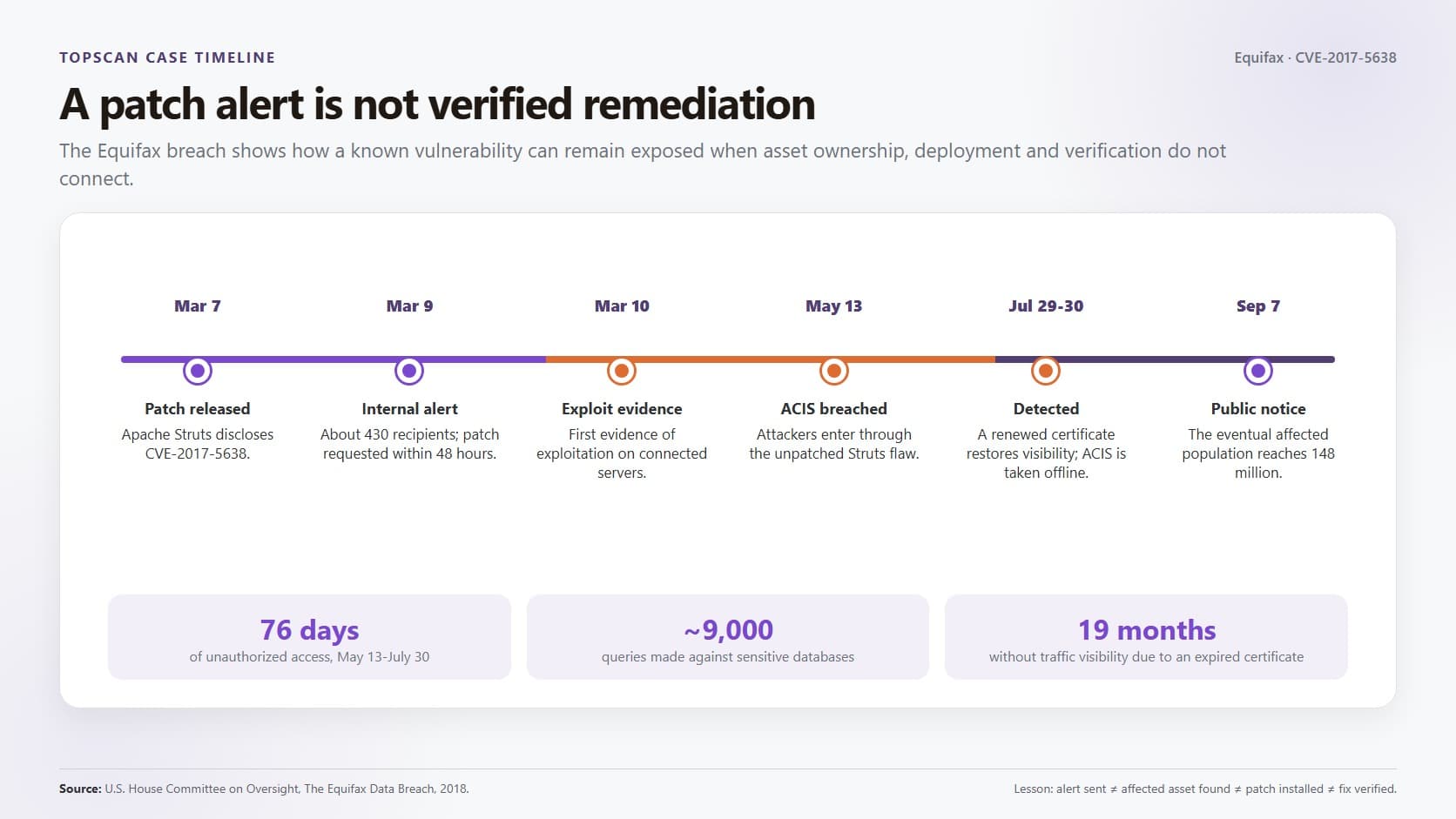
The 2017 Equifax breach is a documented example of a known vulnerability remaining exposed despite a patching policy. A U.S. House Committee report found that Equifax did not patch a vulnerable Apache Struts component in its Automated Consumer Interview System. Attackers later used that environment to reach data, and the breach affected about 148 million people.
The failure was broader than a missing update. The report describes unclear lines of authority, complex legacy systems, incomplete asset identification, and a monitoring certificate that had expired. Those conditions connect the two disciplines: vulnerability management must identify the affected asset, set urgency, assign ownership, and track the risk, while patch management must deploy the update and return reliable verification.
The operational lesson is concrete. Do not close a ticket because a patch was announced, downloaded, or scheduled. Close it after the affected asset is identified, the change is applied or an approved mitigation is active, and a check confirms that the vulnerable state or attack path is gone.
When Patching Is the Right Action and When It Is Not
Patching should lead when the affected product is known, a trusted update is available, and deployment can remove the vulnerable condition. This includes routine operating system and application maintenance as well as urgent treatment of exposed vulnerabilities with confirmed exploitation.
A different response may be required in several situations:
- No patch exists yet. Apply vendor-approved workarounds, restrict access, disable the vulnerable function, add monitoring, or isolate the asset while the team waits for a safe update.
- The product is no longer supported. Segmentation can reduce immediate exposure, but replacement should have an owner and deadline because a legacy system will continue to accumulate unresolved risk.
- The finding is a configuration or access problem. An exposed administration interface, excessive permission, weak authentication setting, or public storage resource needs a configuration or identity change rather than a software update.
- The patch creates material operational risk. Use a short, documented mitigation while testing the update. Record the owner, review date, affected assets, and condition that will end the exception.
- The scanner finding does not apply. Validate the installed version, package path, service state, and vendor advisory before changing production. A false positive should be documented with evidence instead of silently removed.
Editorial judgment: a small team should not build separate patch and vulnerability queues that compete for attention. A single remediation backlog with a treatment field makes the tradeoff visible: patch, mitigate, reconfigure, replace, or accept for a defined period. This approach may need adjustment in highly regulated or safety-critical environments where change approval and segregation of duties require separate systems of record.
A Sustainable Combined Program Needs Clear Operating Rules
A working program does not require a large security department, but it does need consistent ownership and evidence. Five operating rules cover most of the gap between scanning and verified remediation:
- Use one asset identity across tools. Scanner findings, patch deployment records, tickets, and exceptions should refer to the same asset and owner. Otherwise, teams cannot tell whether a successful update applies to the system that produced the finding.
- Maintain routine and emergency lanes. Standard updates can move through scheduled testing and deployment rings. Actively exploited or high-consequence exposures need a faster path with defined approval, rollback, and post-change checks.
- Set risk-based service levels. Avoid a universal deadline based only on a severity label. Use exploitation evidence, internet reachability, business criticality, and operational constraints to set a target date and escalation path.
- Time-limit mitigations and exceptions. A firewall rule or segmentation change may reduce risk quickly, but it should have an owner, verification method, review date, and exit condition. Temporary controls tend to become permanent when nobody tracks them.
- Measure verified outcomes. Track critical-asset coverage, overdue KEV findings, median remediation time, patch success and rollback rates, recurring vulnerabilities, unowned assets, and the percentage of findings closed with validation evidence.
Automation can reduce repetitive work, especially for inventory matching, ticket creation, routine deployment, status collection, and rescanning. It does not remove the need for judgment. High-impact changes still need a deployment strategy that reflects dependency, availability, and rollback risk.
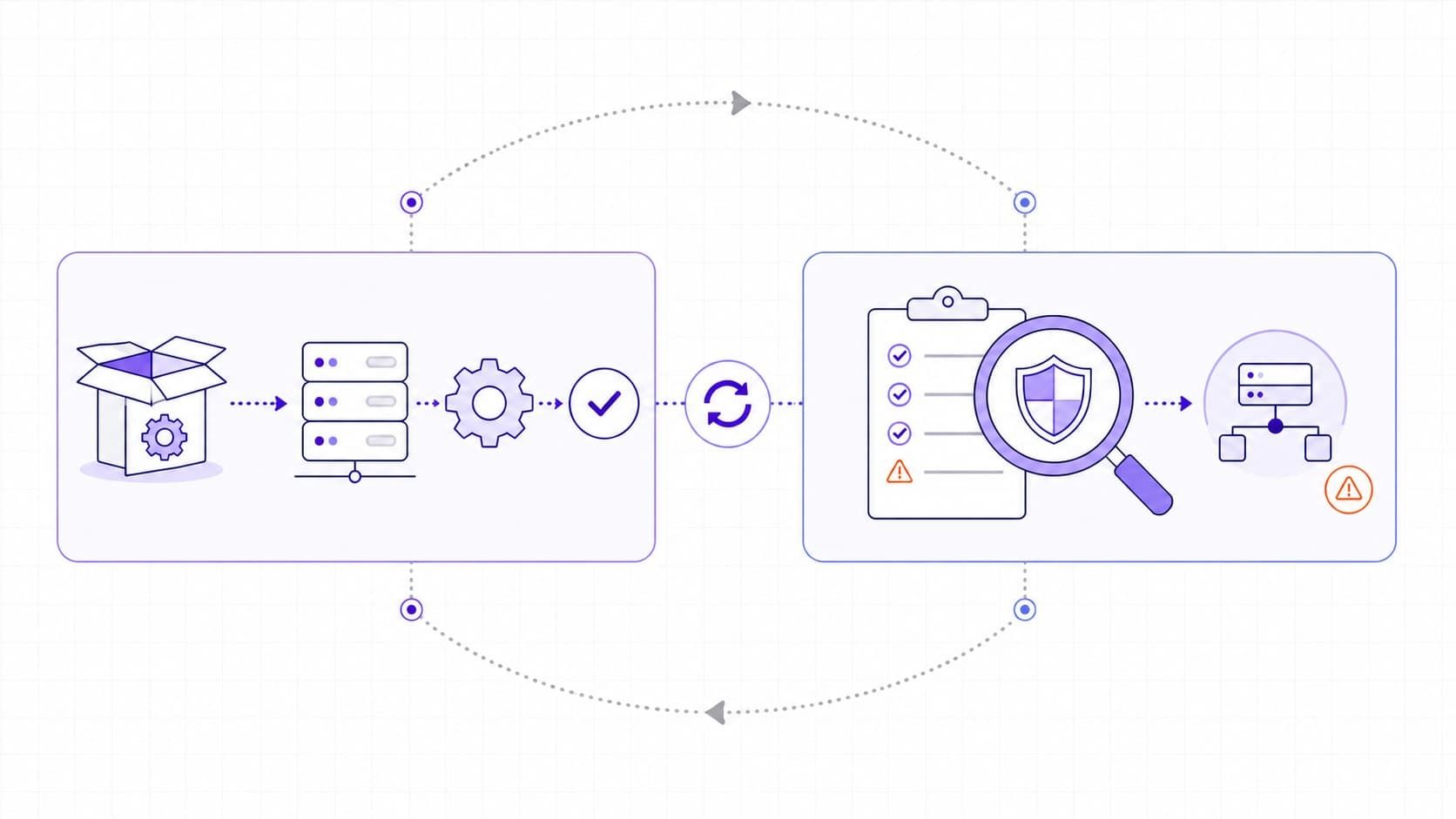
A Shared Fix-and-Verify Loop Turns Findings into Risk Reduction
Patch management is a treatment process. Vulnerability management is the decision and accountability process around a wider set of weaknesses. Neither is complete on its own: vulnerability management without dependable remediation produces an expanding backlog, while patch management without risk context can update many systems without addressing the most consequential exposure first.
Start with one practical change. Require every high-priority finding to include the affected asset, owner, treatment, target date, and closure evidence. That shared record connects discovery to patching or mitigation and makes the final question answerable: did the change actually reduce the risk?